Newsletter Get notified when a new post is published.
Xây dựng kiến trúc serverless cho hệ thống đăng ký sự kiện trên AWS — LinuxUnity
Kỹ sư Cloud & DevOps với đam mê xây dựng hạ tầng tự động hóa.
Xây dựng kiến trúc serverless cho hệ thống đăng ký sự kiện trên AWS Giới thiệu Trong bài viết này, mình xây dựng một hệ thống đăng ký sự…
Table of Contents
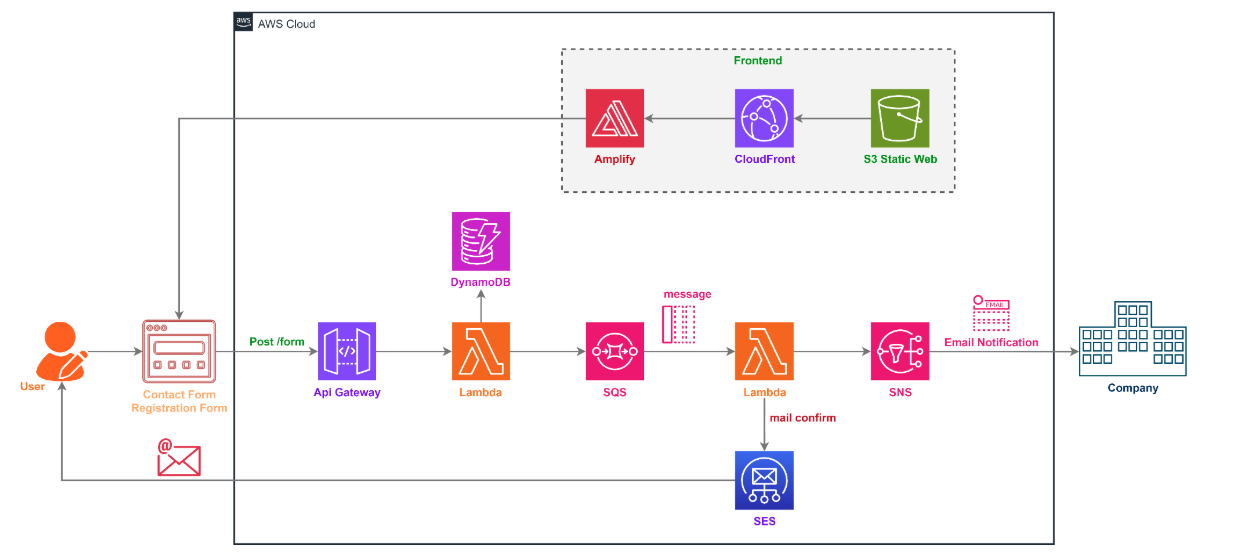
Trong bài viết này, mình xây dựng một hệ thống đăng ký sự kiện theo mô hình serverless trên AWS . Mục tiêu của hệ thống là cho phép người dùng điền form đăng ký trên giao diện web, sau đó backend sẽ tự động tiếp nhận dữ liệu, lưu trữ thông tin, gửi email xác nhận cho người đăng ký và đồng thời thông báo cho quản trị viên.
Điểm chính của mô hình này là không cần quản lý server truyền thống . Thay vào đó, các thành phần như giao diện, API, xử lý backend, lưu trữ dữ liệu và gửi thông báo đều được triển khai bằng các dịch vụ managed của AWS. Điều này giúp hệ thống dễ triển khai, dễ mở rộng và phù hợp với các bài toán như event registration, contact form hoặc lead collection.
Hệ thống hoạt động theo các bước sau:
Người dùng truy cập giao diện web được deploy trên Amplify và điền form đăng ký gồm các thông tin như họ tên, email.Khi người dùng bấm submit, frontend gửi request POST /register đến API Gateway .
API Gateway chuyển request đến
Lambda Registration
Lambda Registration kiểm tra dữ liệu đầu vào, sau đó tạo một bản ghi đăng ký và lưu vào DynamoDB .
Sau khi lưu thành công, Lambda tiếp tục đẩy một message chứa thông tin đăng ký vào SQS .
Sender Lambda được trigger từ SQS để xử lý bất đồng bộ.
Sender Lambda gửi email xác nhận cho người dùng qua SES và gửi thông báo cho admin qua SNS . Với cách tách này, bước nhận đăng ký và bước gửi thông báo được xử lý riêng biệt, giúp hệ thống phản hồi nhanh hơn và ổn định hơn khi có nhiều request cùng lúc.
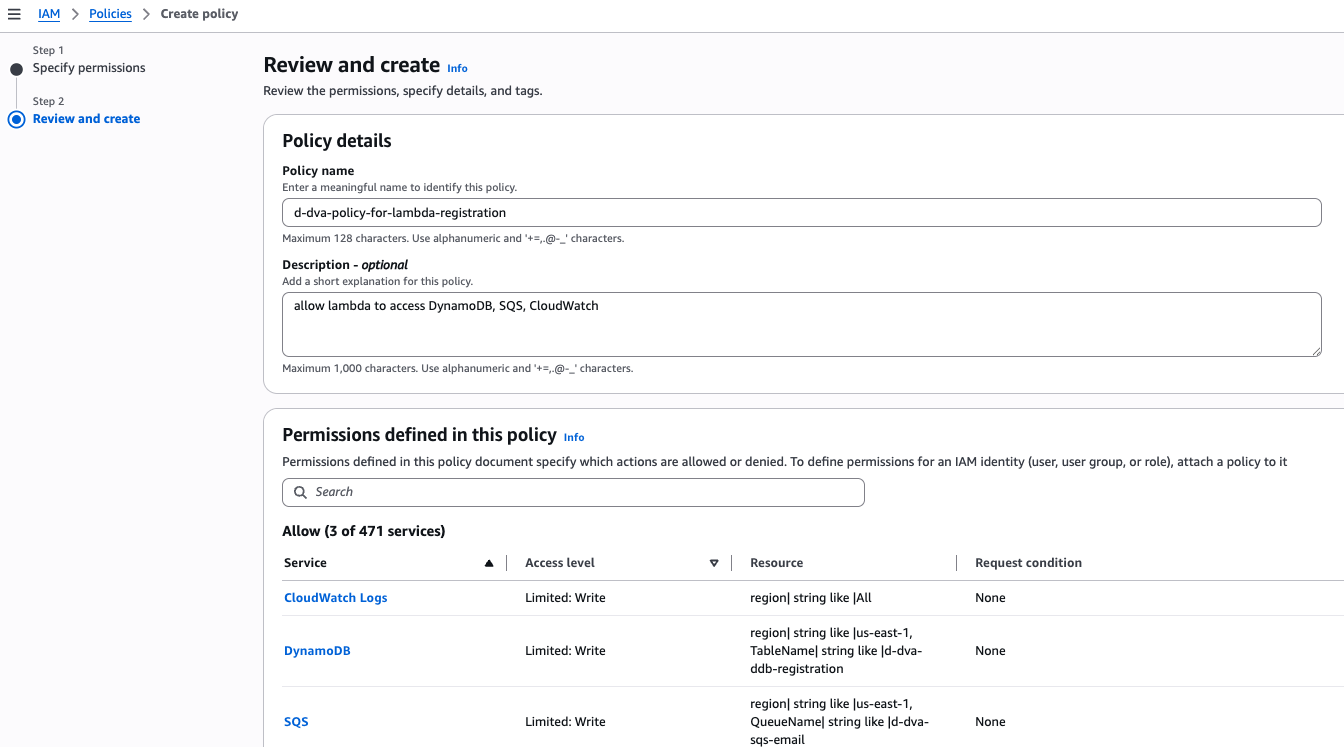
IAM → Policies → Create policy
Thêm policy sau với dạng JSON. Đồng thời thay <ACCOUNT ID> bằng AWS Account ID của bạn.
{ "Version": "2012-10-17", "Statement": [ { "Sid": "WriteToDynamoDB", "Effect": "Allow", "Action": [ "dynamodb:PutItem" ], "Resource": "arn:aws:dynamodb:us-east-1:<ACCOUNT ID>:table/d-dva-ddb-registration" }, { "Sid": "SendToSQS", "Effect": "Allow", "Action": [ "sqs:SendMessage" ], "Resource": "arn:aws:sqs:us-east-1:<ACCOUNT ID>:d-dva-sqs-email" }, { "Sid": "CloudWatchLogsMinimal", "Effect": "Allow", "Action": [ "logs:CreateLogGroup", "logs:CreateLogStream", "logs:PutLogEvents" ], "Resource": [ "arn:aws:logs:*:*:*" ] } ] }
Policy name: d-dva-policy-for-lambda-registration
Description – optional: allow lambda to access DynamoDB, SQS, CloudWatch
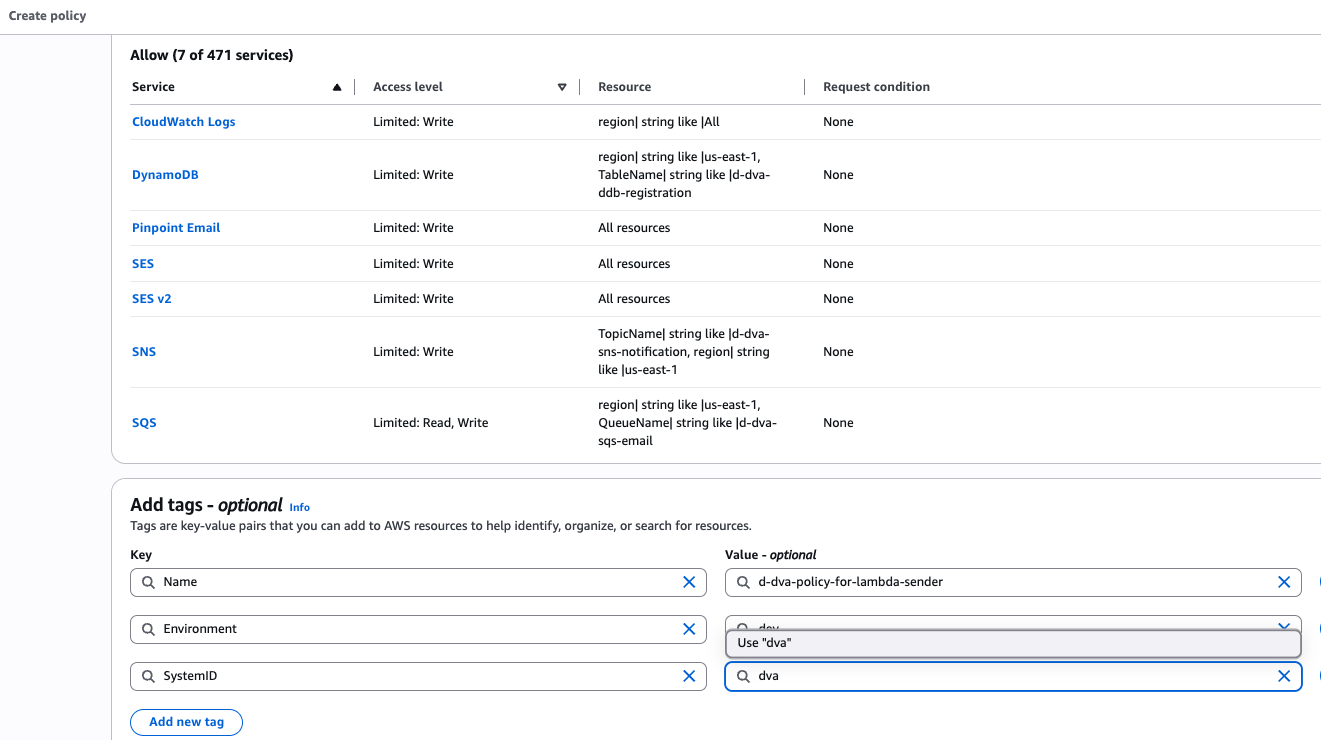
Name: d-dva-policy-for-lambda-registration
Environment: dev
SystemID: dva
IAM → Roles → Create role
Trusted entity type: AWS service
Use case: Lambda
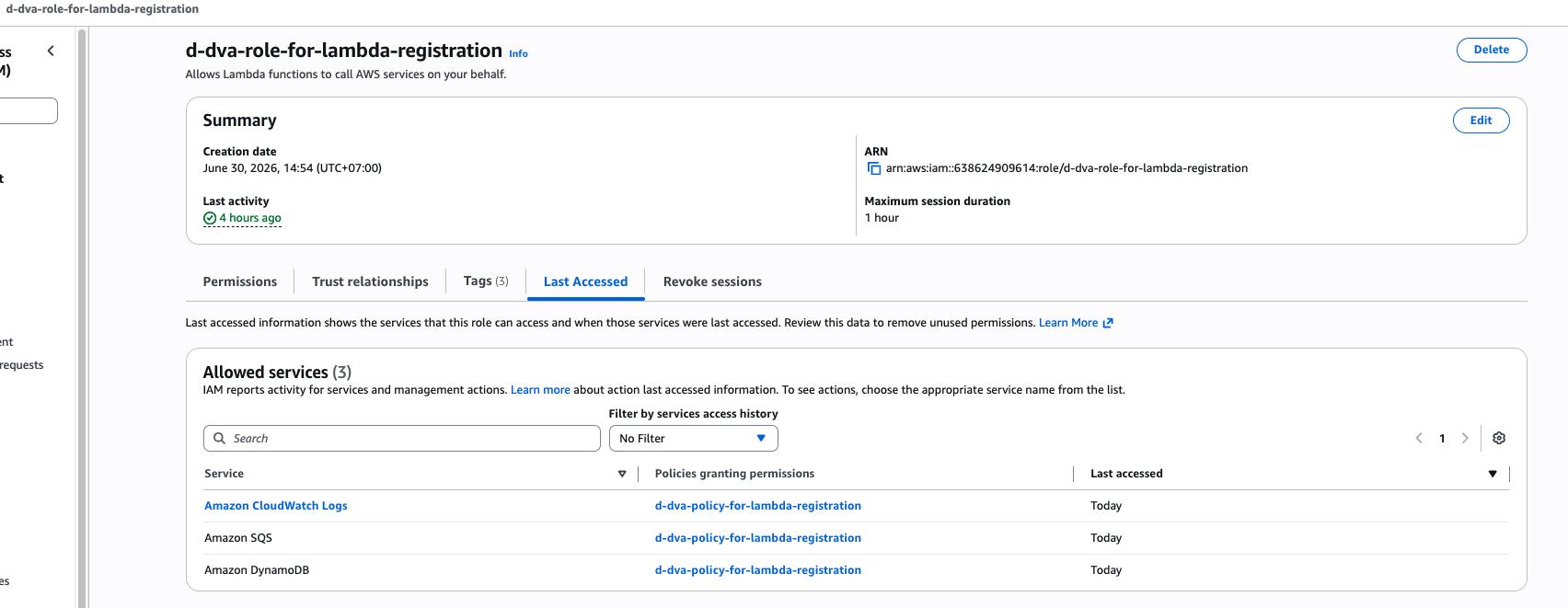
Policy name: d-dva-policy-for-lambda-registration
Role name: d-dva-role-for-lambda-registration
Name: d-dva-policy-for-lambda-registration
Environment: dev
SystemID: dva
Sau đó tiến hành tạo role
Policy name: d-dva-policy-for-lambda-sender
Description – optional: allow update DynamoDB, send mail via SNS, SES, push log to CloudWatch
{ "Version": "2012-10-17", "Statement": [ { "Sid": "CloudWatchLogsMinimal", "Effect": "Allow", "Action": [ "logs:CreateLogGroup", "logs:CreateLogStream", "logs:PutLogEvents" ], "Resource": [ "arn:aws:logs:*:*:*" ] }, { "Sid": "AllowSQSPolling", "Effect": "Allow", "Action": [ "sqs:ReceiveMessage", "sqs:DeleteMessage", "sqs:GetQueueAttributes", "sqs:GetQueueUrl", "sqs:ChangeMessageVisibility" ], "Resource": "arn:aws:sqs:us-east-1:<ACCOUNT ID>:d-dva-sqs-email" }, { "Sid": "SendViaSES", "Effect": "Allow", "Action": [ "ses:SendEmail", "ses:SendRawEmail", "ses:SendTemplatedEmail" ], "Resource": "*" }, { "Sid": "PublishToSNS", "Effect": "Allow", "Action": [ "sns:Publish" ], "Resource": "arn:aws:sns:us-east-1:<ACCOUNT ID>:d-dva-sns-notification" }, { "Sid": "UpdateSendEmailStatus", "Effect": "Allow", "Action": [ "dynamodb:UpdateItem" ], "Resource": "arn:aws:dynamodb:us-east-1:<ACCOUNT ID>:table/d-dva-ddb-registration" } ] }
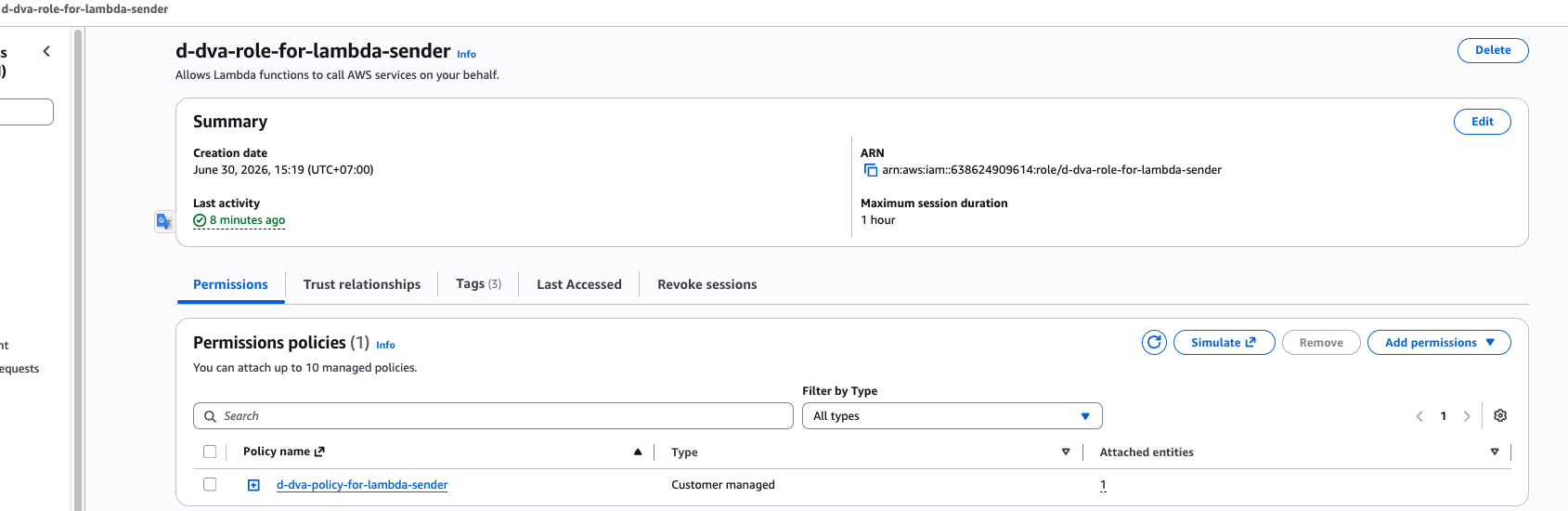
Thực hiện tạo role d-dva-policy-for-lambda-sender và gán policy d-dva-policy-for-lambda-sender.
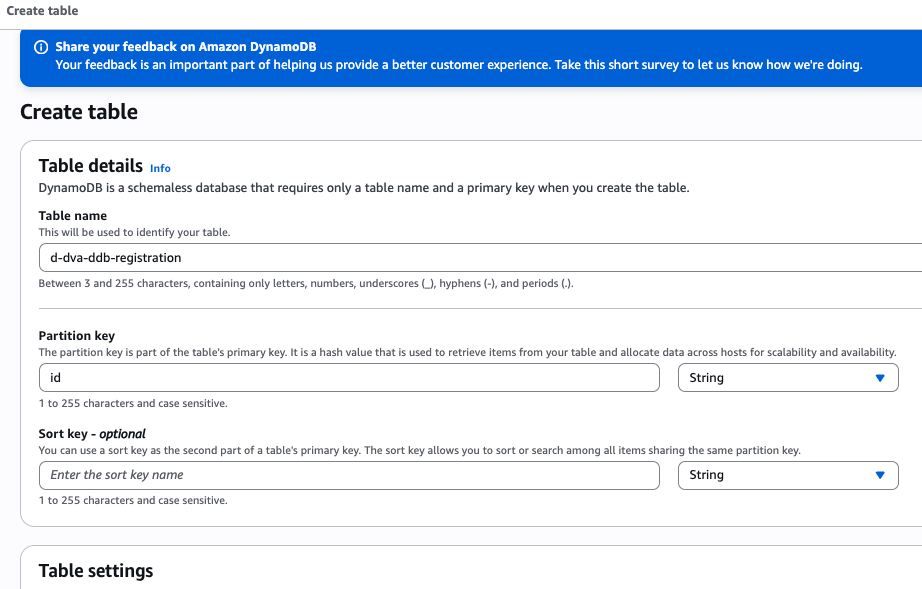
DynamoDB → Tables → Create table
Table name: d-dva-ddb-registration
Partition key: id (String)
Name: d-dva-ddb-registration
Environment: dev
SystemID: dva
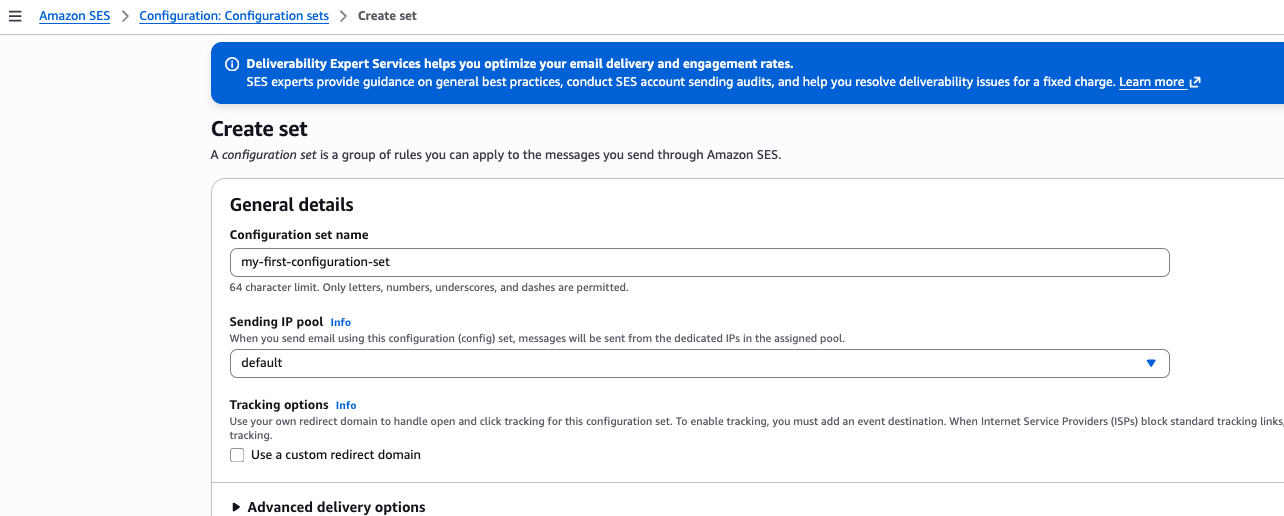
Amazon SES → Configuration: Configuration sets → Create set
Configuration set name: my-first-configuration-set
Name: d-dva-policy-for-lambda-registration
Environment: dev
SystemID: dva
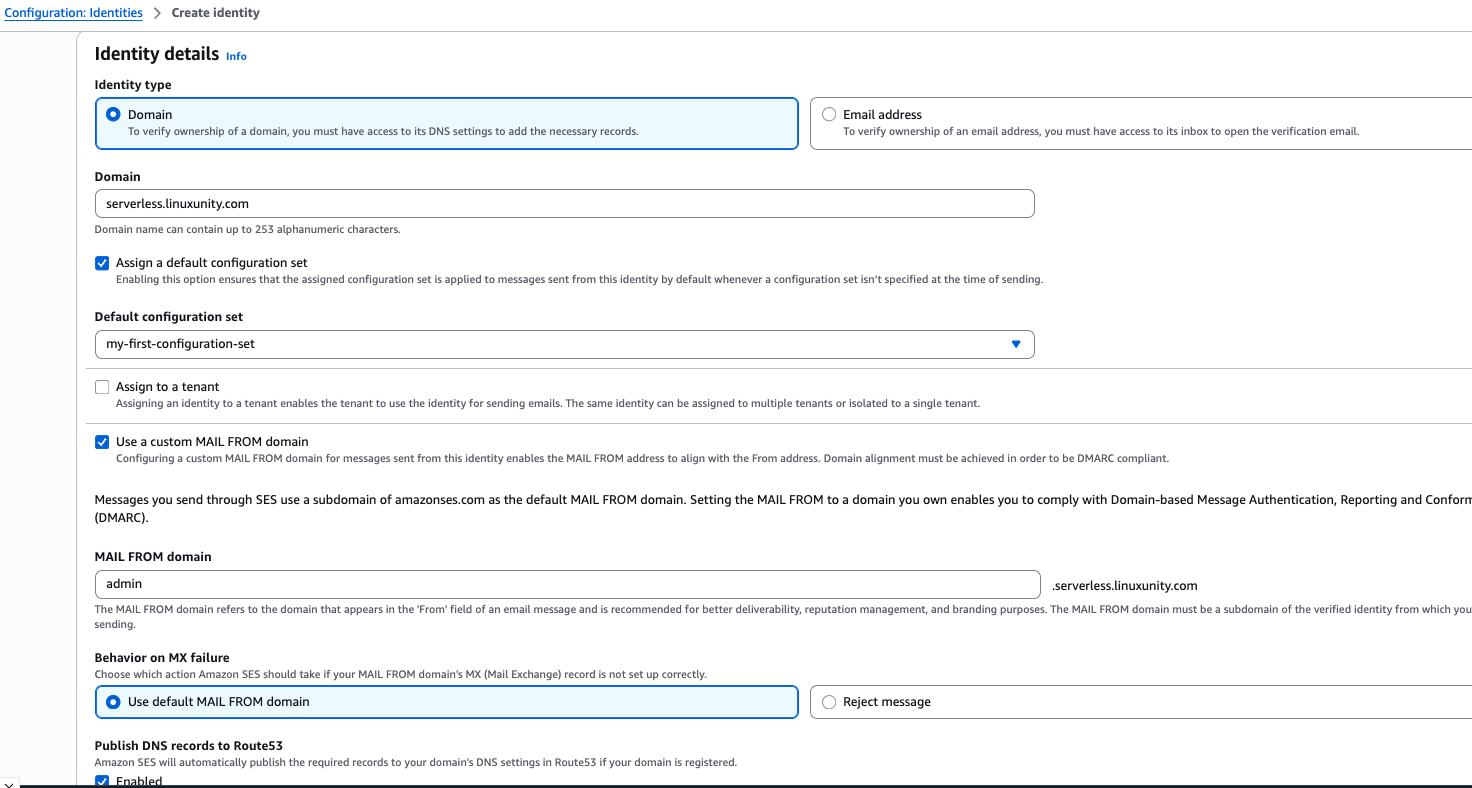
Amazon SES → Configuration: Identities → Create identity
Identity type: Domain
Domain: your domain
Assign a default configuration set: x
Default configuration set: my-first-configuration-set
Use a custom MAIL FROM domain: x
MAIL FROM domain: your custom domain name
Name: d-dva-ses-identity-domain
Environment: dev
SystemID: dva
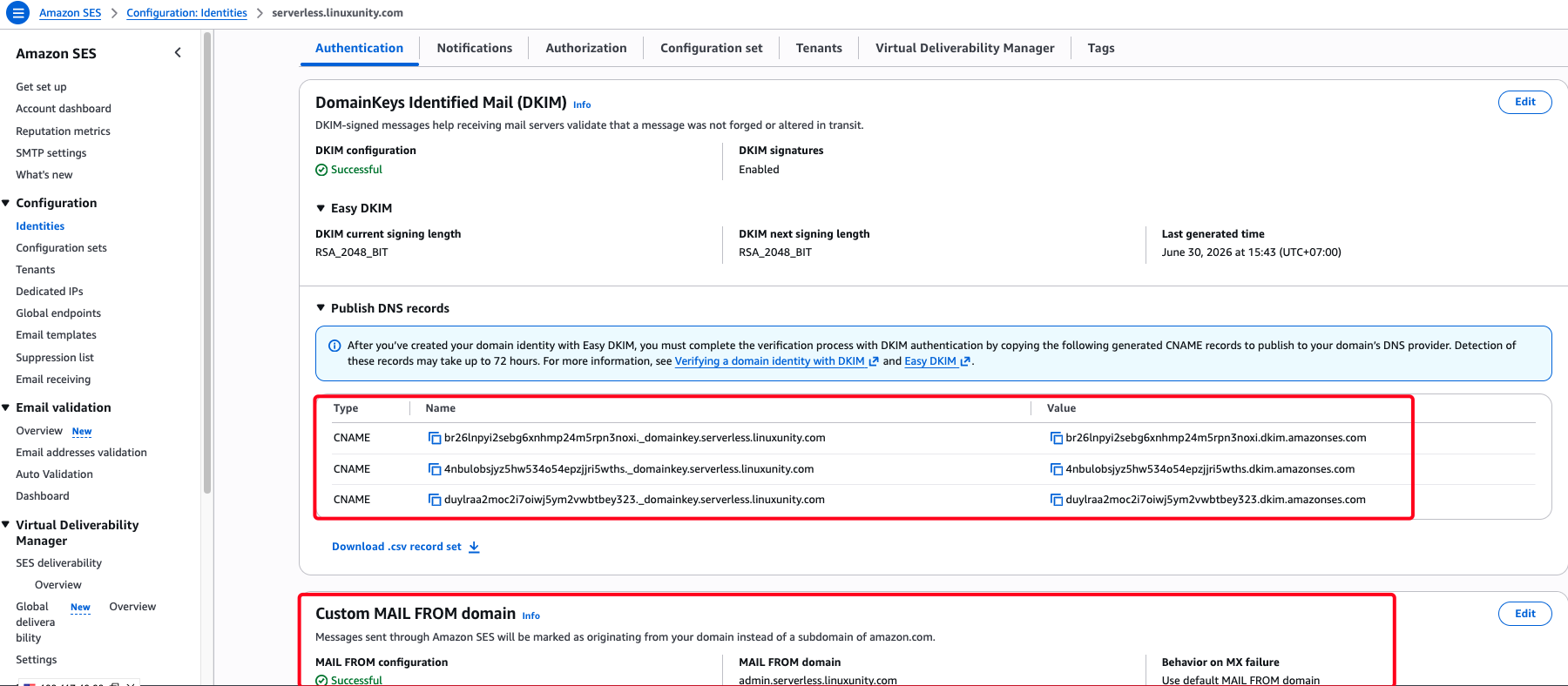
Sau đó, bạn cần tạo các bản ghi như yêu cầu của AWS SES để xác thực.
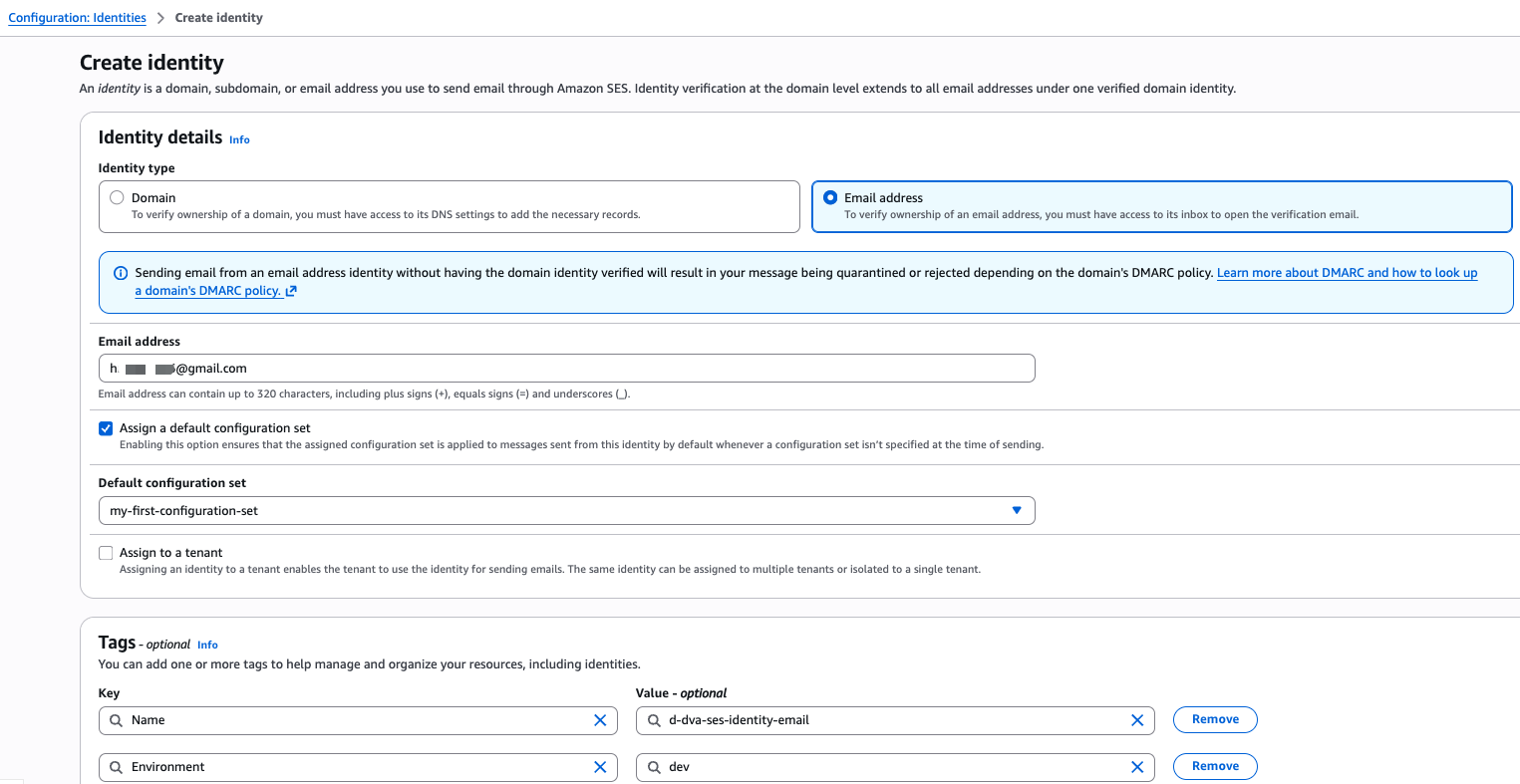
Amazon SES → Configuration: Identities → Create identity
Identity type: Email address
Email address: your email
Assign a default configuration set: x
Name: d-dva-ses-identity-domain
Environment: dev
SystemID: dva
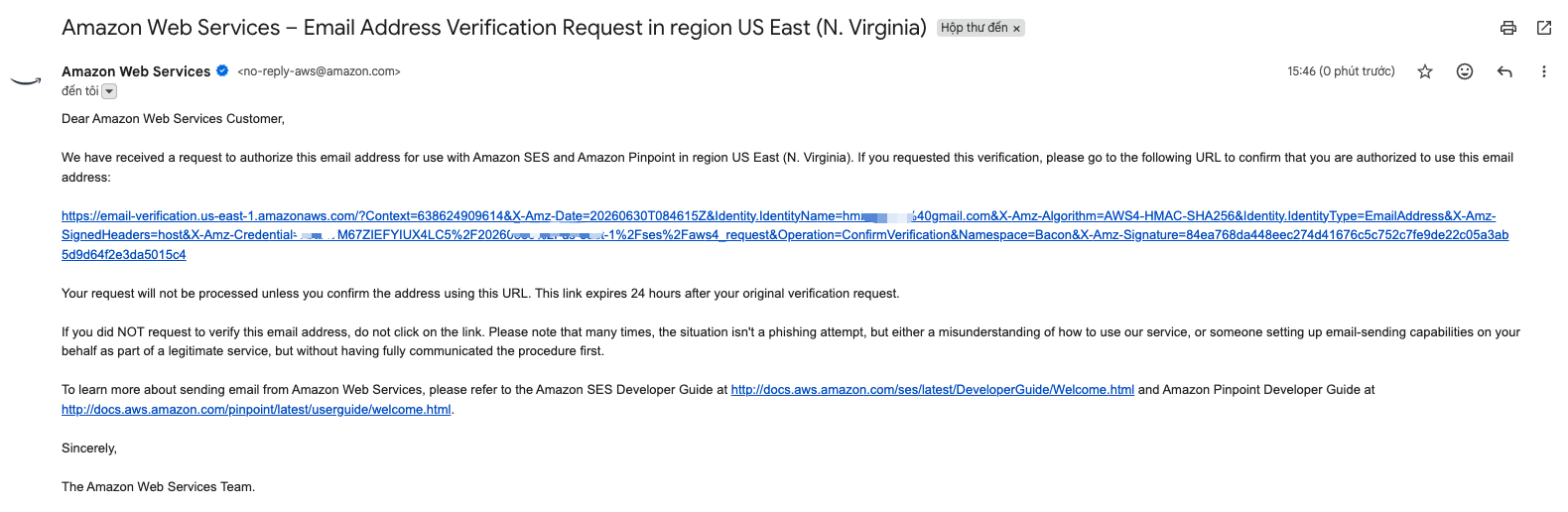
Xác thực email: Lúc này AWS sẽ gửi mail đến email bạn vừa đăng ký để bạn thực hiện xác thực.
Đợi 1 lúc, SES sẽ verified Identities vừa tạo.
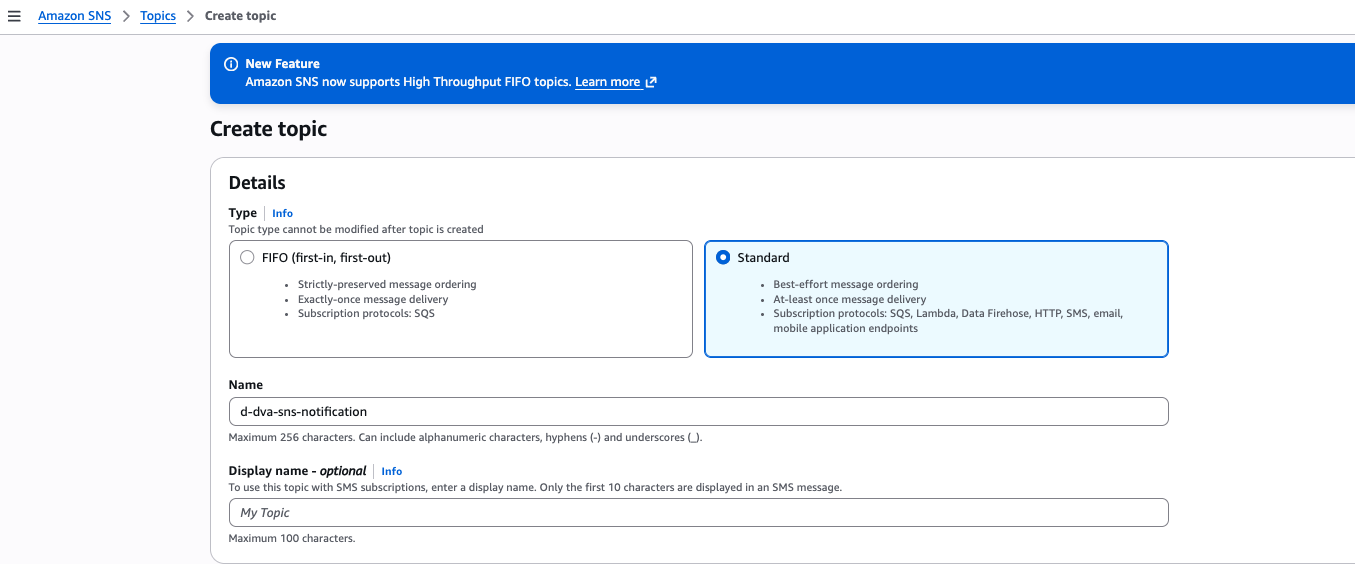
Amazon SNS → Topics → Create topic
Type: Standard
Name: d-dva-sns-notification
Name: d-dva-sns-notification
Environment: dev
SystemID: dva
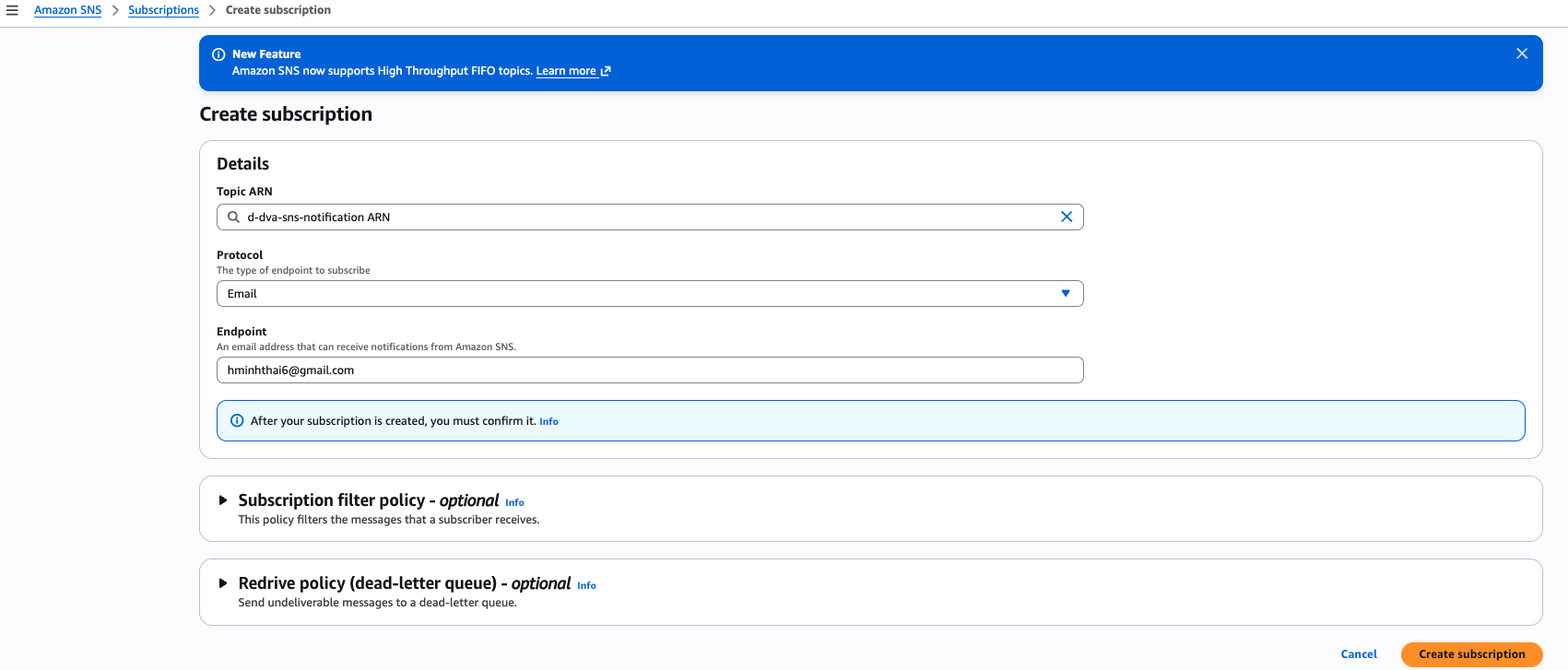
Amazon SNS → Subscriptions → Create subscription
Topic ARN: d-dva-sns-notification ARN
Protocol: Email
Endpoint: your email
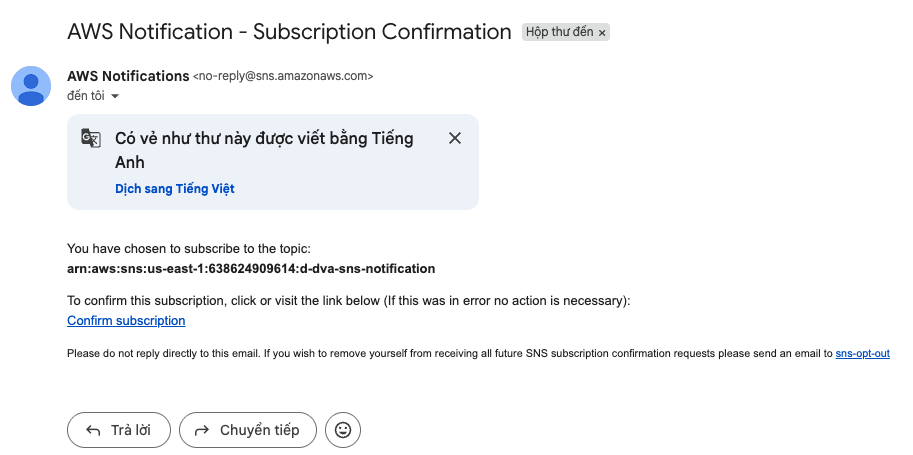
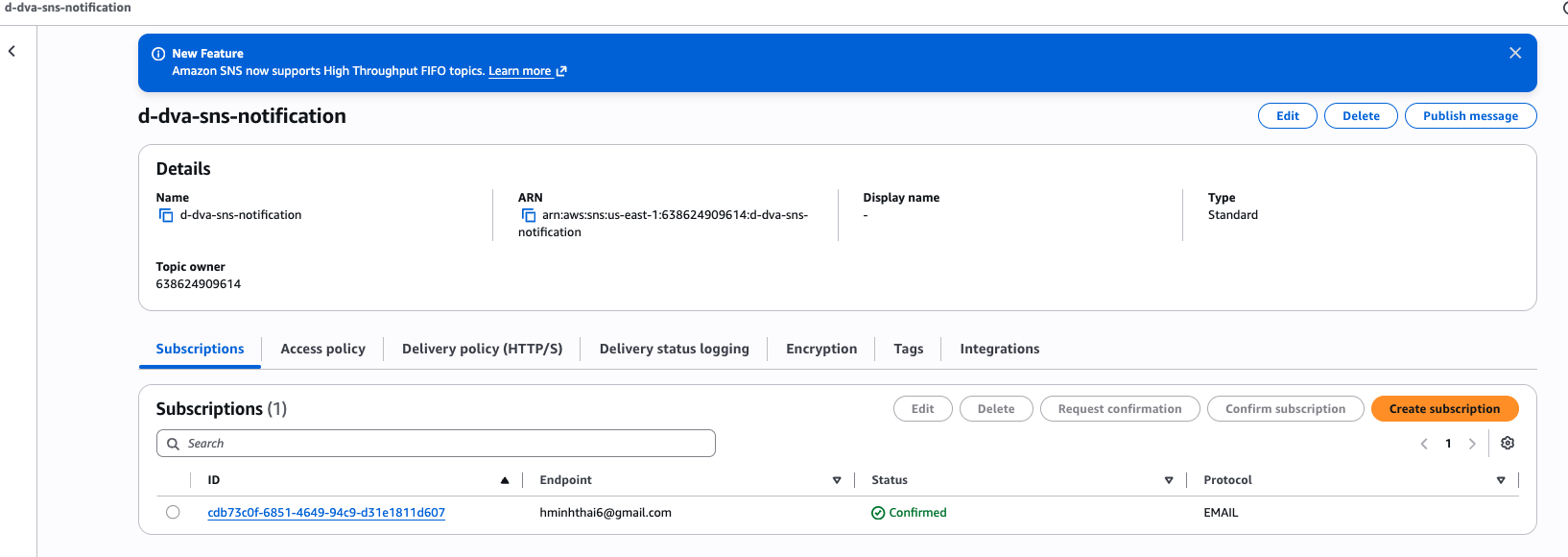
Sau khi tạo subscription, AWS cũng sẽ gửi mail đến email của bạn để subscribe.
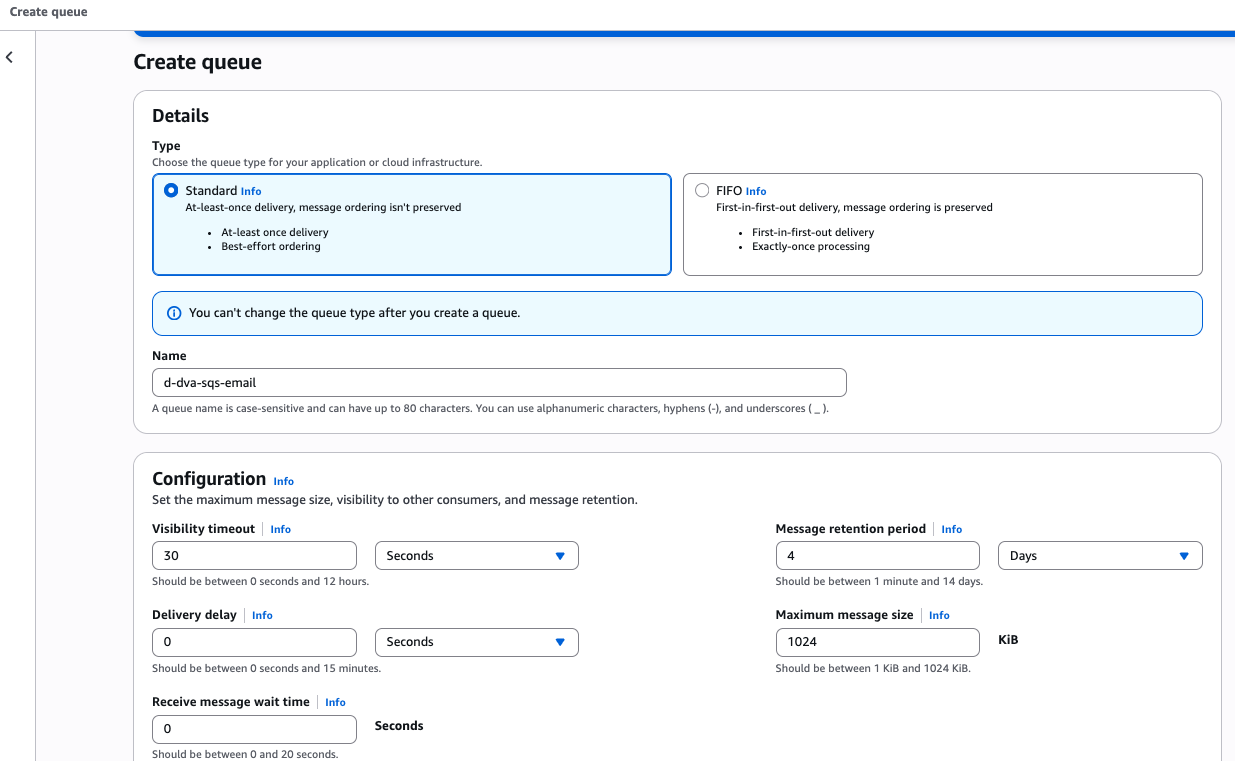
Amazon SQS → Create queue
Type: Standard
Name: d-dva-sqs-email
Name: d-dva-sqs-email
Environment: dev
SystemID: dva
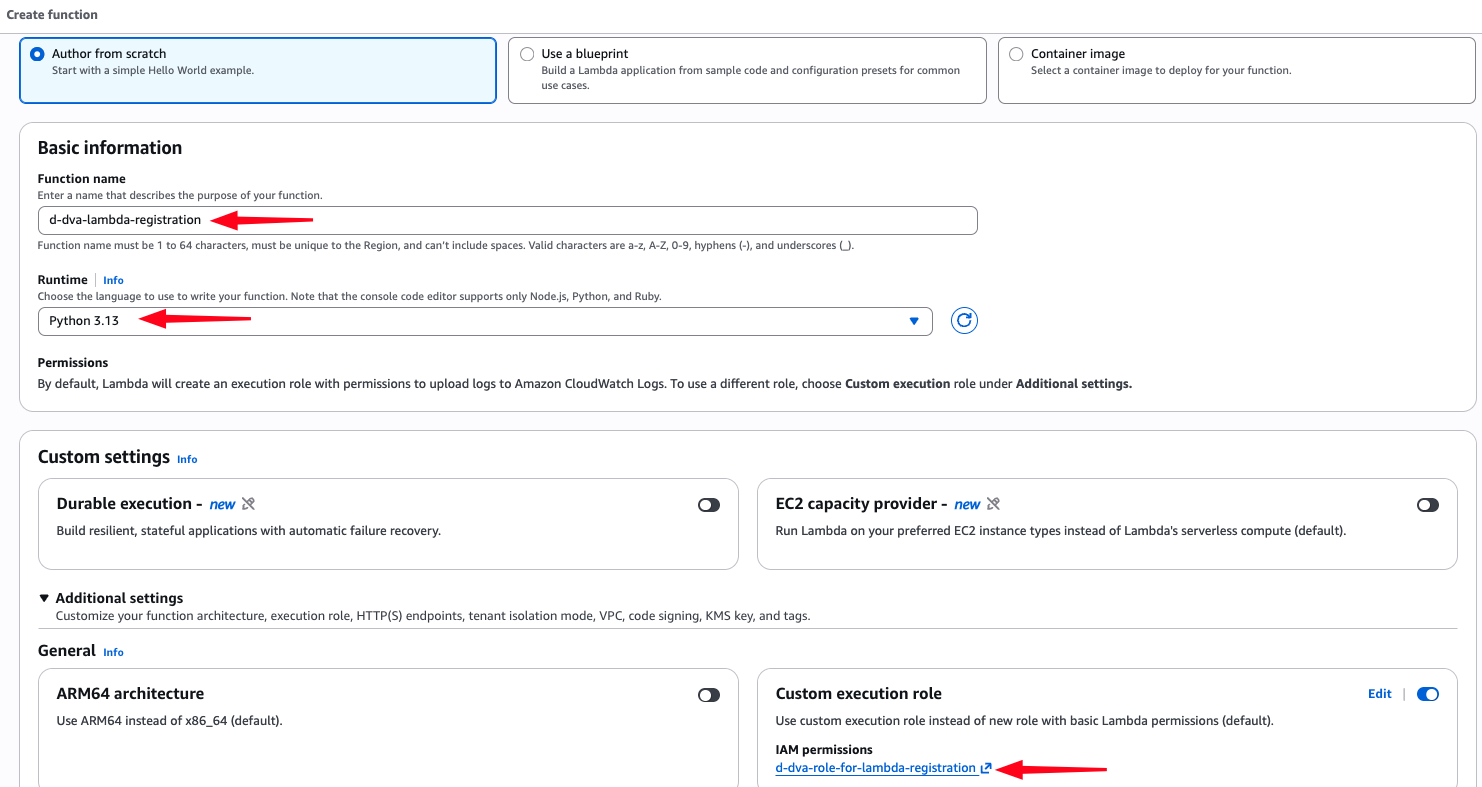
Lambda → Functions → Create function
Author from scratch
Function name: d-dva-lambda-registration
Runtime: Python 3.13
Custom execution role: d-dva-role-for-lambda-registration
Name: d-dva-lambda-registration
Environment: dev
SystemID: dva
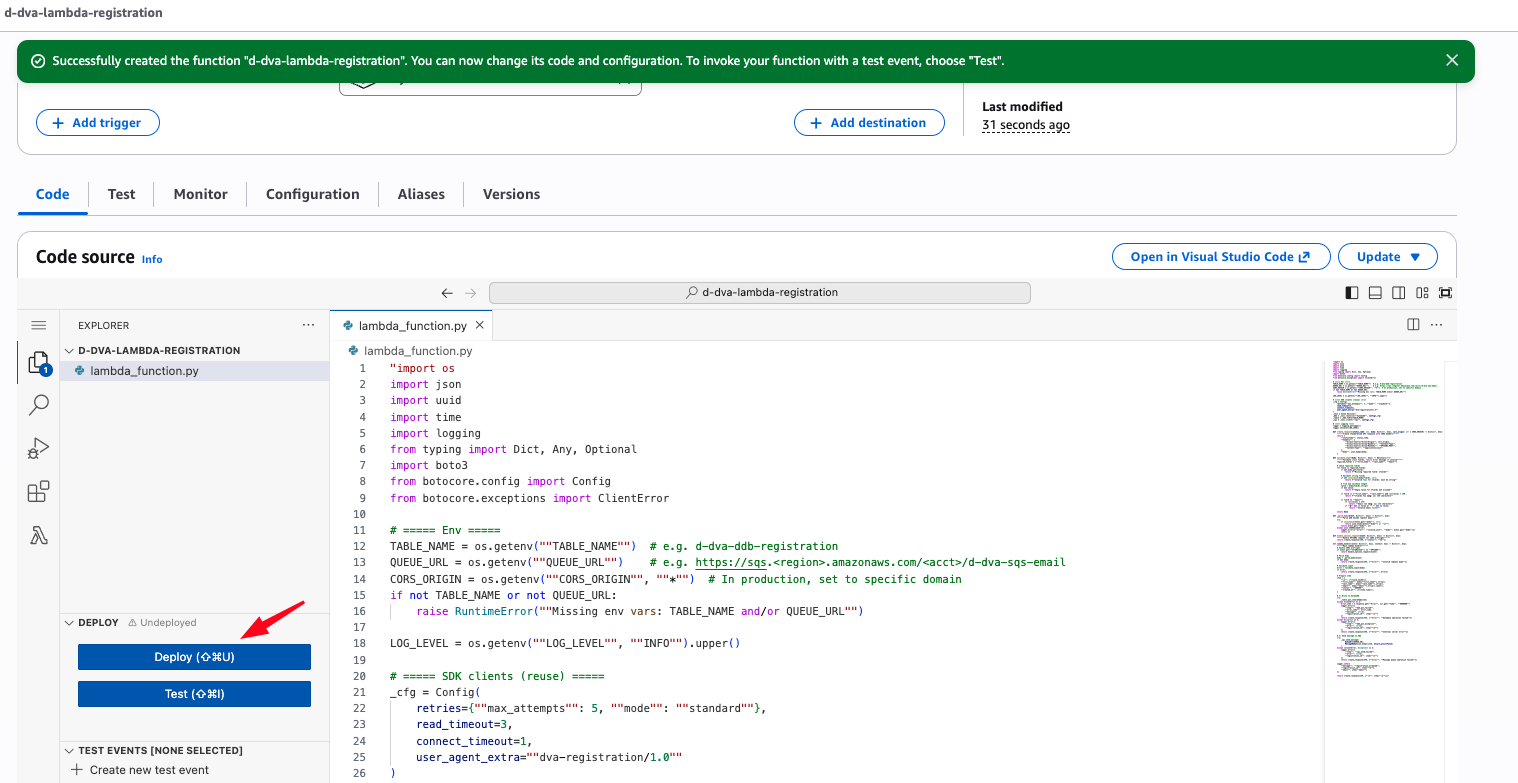
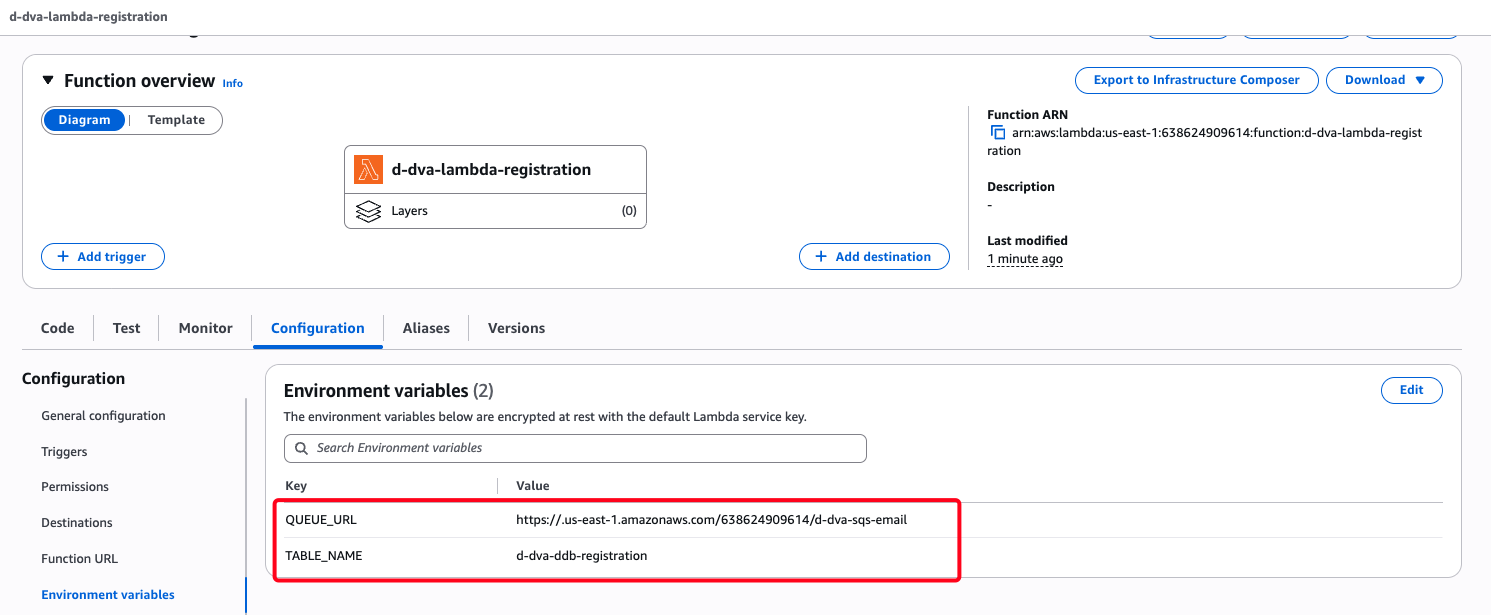
import os import json import uuid import time import logging from typing import Dict, Any, Optional import boto3 from botocore.config import Config from botocore.exceptions import ClientError # ===== Env ===== TABLE_NAME = os.getenv("TABLE_NAME") # e.g. d-dva-ddb-registration QUEUE_URL = os.getenv("QUEUE_URL") # e.g. https://sqs.<region>.amazonaws.com/<acct>/d-dva-sqs-email CORS_ORIGIN = os.getenv("CORS_ORIGIN", "*") # In production, set to specific domain if not TABLE_NAME or not QUEUE_URL: raise RuntimeError("Missing env vars: TABLE_NAME and/or QUEUE_URL") LOG_LEVEL = os.getenv("LOG_LEVEL", "INFO").upper() # ===== SDK clients (reuse) ===== _cfg = Config( retries={"max_attempts": 5, "mode": "standard"}, read_timeout=3, connect_timeout=1, user_agent_extra="dva-registration/1.0" ) _sess = boto3.Session() _ddb = _sess.resource("dynamodb", config=_cfg) _table = _ddb.Table(TABLE_NAME) _sqs = _sess.client("sqs", config=_cfg) # ===== Logging ===== logger = logging.getLogger() logger.setLevel(LOG_LEVEL) def create_response(status_code: int, body: Dict[str, Any], cors_origin: str = CORS_ORIGIN) -> Dict[str, Any]: """Create standardized API response with CORS headers""" return { "statusCode": status_code, "headers": { "Access-Control-Allow-Origin": cors_origin, "Access-Control-Allow-Headers": "Content-Type", "Access-Control-Allow-Methods": "OPTIONS,POST", "Content-Type": "application/json" }, "body": json.dumps(body) } def validate_input(body: Dict[str, Any]) -> Optional[str]: """Validate input fields, return error message if invalid""" required_fields = ["first_name", "last_name", "email"] # Check required fields for field in required_fields: if not body.get(field): return f"Missing required field: {field}" # Validate string fields if not isinstance(body[field], str): return f"Invalid type for {field}: must be string" # Trim and validate length value = body[field].strip() if not value: return f"Empty value for {field} not allowed" if field in ["first_name", "last_name"] and len(value) > 100: return f"{field} too long: max 100 characters" if field == "email": if len(value) > 254: return "Email too long: max 254 characters" if "@" not in value or "." not in value: return "Invalid email format" return None def _parse_body(event: Dict[str, Any]) -> Dict[str, Any]: """Parse and decode request body""" try: if isinstance(event.get("body"), str): return json.loads(event["body"] or "{}") return event.get("body", {}) except json.JSONDecodeError: logger.error({"error": "invalid_json", "body": event.get("body")}) return {} def handle_options_request(event: Dict[str, Any]) -> Dict[str, Any]: """Handle OPTIONS request for CORS preflight""" return create_response(200, {"status": "ok"}) def lambda_handler(event: Dict[str, Any], context: Any) -> Dict[str, Any]: """Main Lambda handler""" # Handle CORS preflight if event.get("httpMethod") == "OPTIONS": return handle_options_request(event) # Parse body body = _parse_body(event) if not body: return create_response(400, {"error": "Invalid request body"}) # Validate input error = validate_input(body) if error: return create_response(400, {"error": error}) # Prepare item item = { "id": str(uuid.uuid4()), "first_name": body["first_name"].strip(), "last_name": body["last_name"].strip(), "email": body["email"].strip().lower(), "status": "QUEUED", "created_at": int(time.time()), } # 1) Write to DynamoDB try: _table.put_item(Item=item) except ClientError as e: error_code = e.response.get("Error", {}).get("Code", "UNKNOWN") logger.error({ "step": "ddb_put_failed", "error_code": error_code, "message": str(e), "registration_id": item["id"] }) return create_response(500, {"error": "Database operation failed"}) except Exception as e: logger.error({ "step": "ddb_put_exception", "error": str(e), "registration_id": item["id"] }) return create_response(500, {"error": "Internal server error"}) # 2) Send message to SQS try: _sqs.send_message( QueueUrl=QUEUE_URL, MessageBody=json.dumps(item, ensure_ascii=False) ) except (ClientError, Exception) as e: logger.error({ "step": "sqs_send_failed", "error": str(e), "registration_id": item["id"] }) return create_response(500, {"error": "Message queue operation failed"}) logger.info({ "message": "registration_accepted", "registration_id": item["id"], "email": item["email"] }) return create_response(200, {"id": item["id"]}) Tạo Environment variables
QUEUE_URL: <URL SQS d-dva-sqs-email tạo ở bước trên>
TABLE_NAME: d-dva-ddb-registration
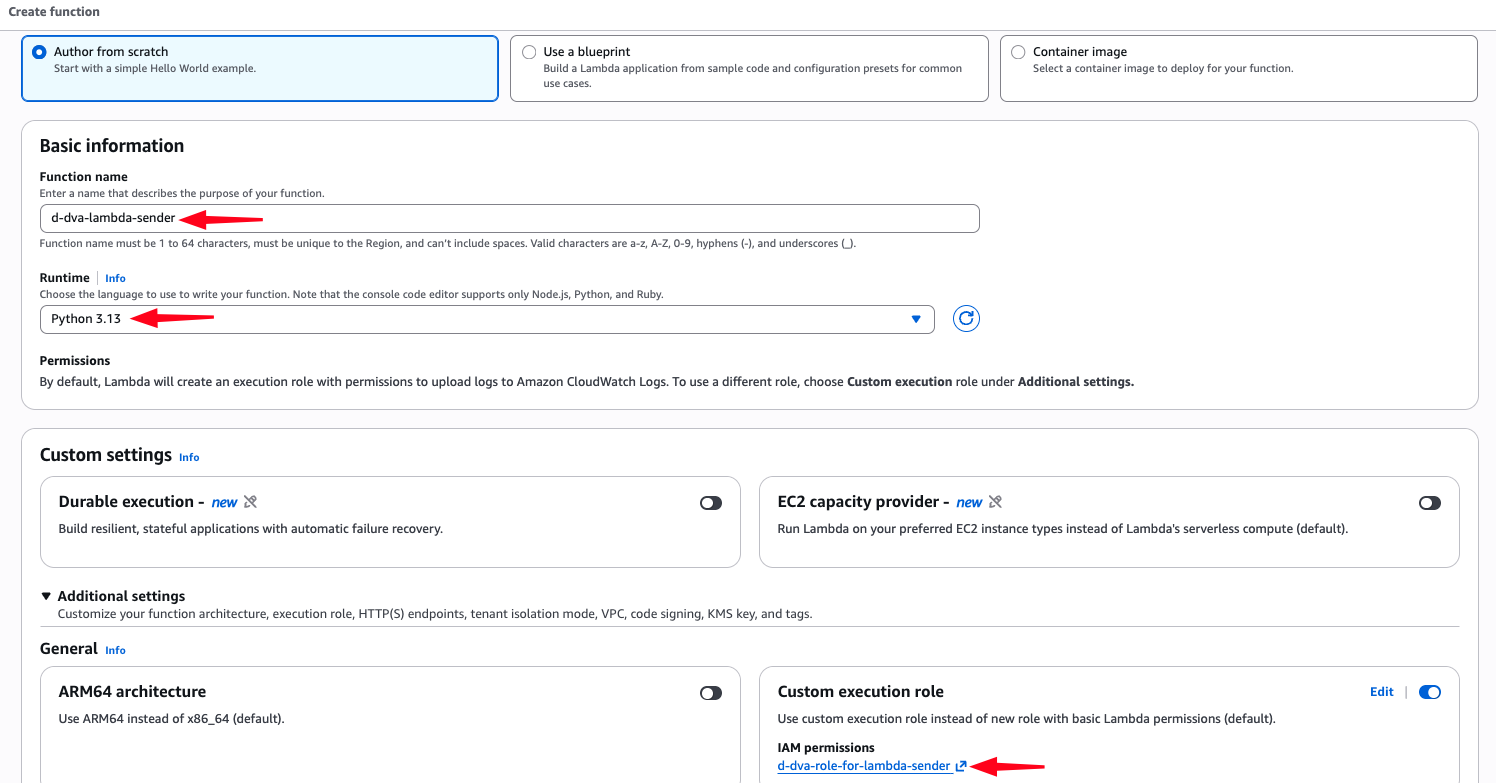
Author from scratch
Function name: d-dva-lambda-sender
Runtime: Python 3.13
Custom execution role: d-dva-role-for-lambda-sender
Name: d-dva-lambda-sender
Environment: dev
SystemID: dva
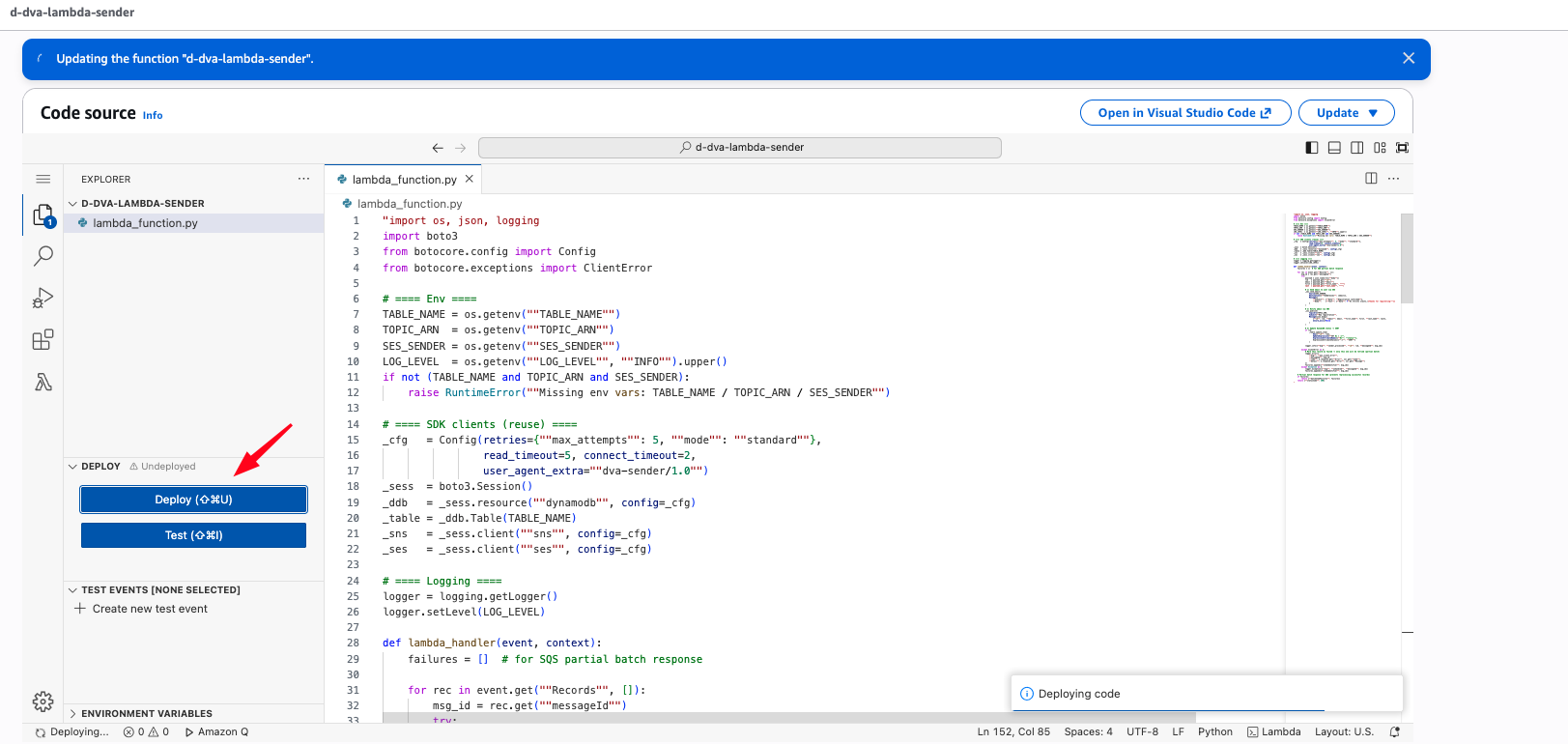
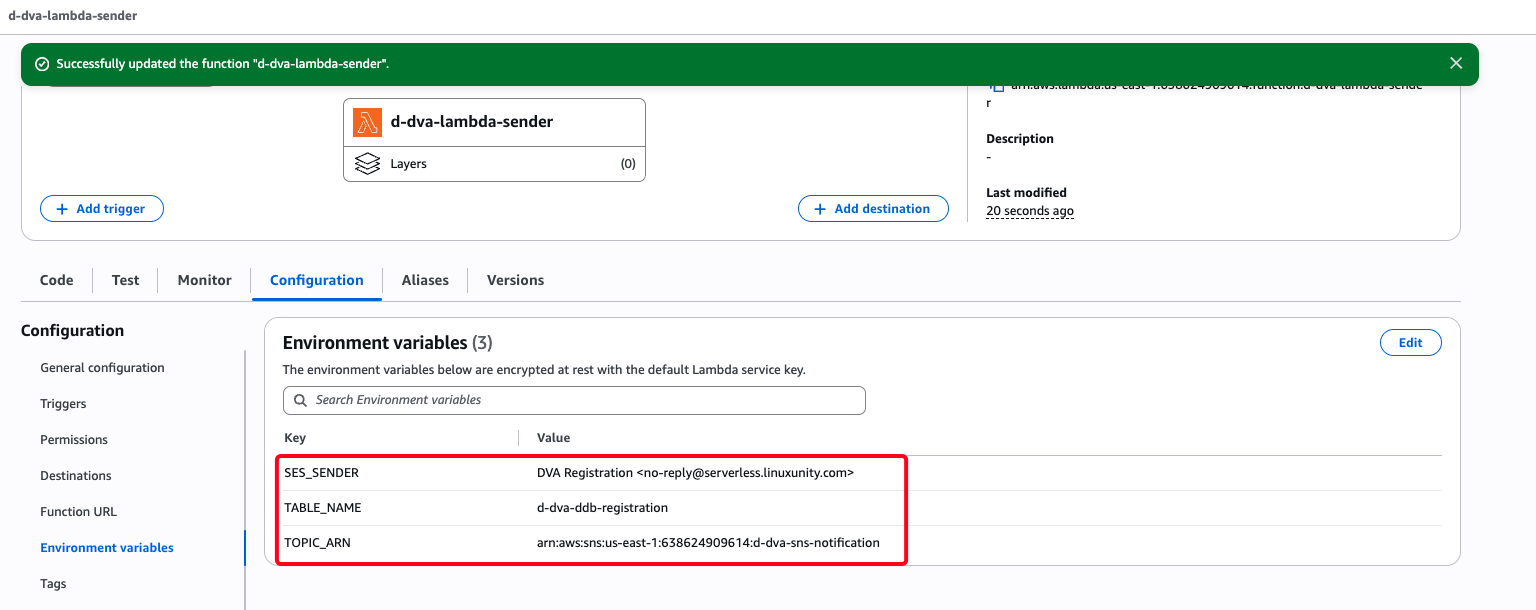
import os, json, logging import boto3 from botocore.config import Config from botocore.exceptions import ClientError # ==== Env ==== TABLE_NAME = os.getenv("TABLE_NAME") TOPIC_ARN = os.getenv("TOPIC_ARN") SES_SENDER = os.getenv("SES_SENDER") LOG_LEVEL = os.getenv("LOG_LEVEL", "INFO").upper() if not (TABLE_NAME and TOPIC_ARN and SES_SENDER): raise RuntimeError("Missing env vars: TABLE_NAME / TOPIC_ARN / SES_SENDER") # ==== SDK clients (reuse) ==== _cfg = Config(retries={"max_attempts": 5, "mode": "standard"}, read_timeout=5, connect_timeout=2, user_agent_extra="dva-sender/1.0") _sess = boto3.Session() _ddb = _sess.resource("dynamodb", config=_cfg) _table = _ddb.Table(TABLE_NAME) _sns = _sess.client("sns", config=_cfg) _ses = _sess.client("ses", config=_cfg) # ==== Logging ==== logger = logging.getLogger() logger.setLevel(LOG_LEVEL) def lambda_handler(event, context): failures = [] # for SQS partial batch response for rec in event.get("Records", []): msg_id = rec.get("messageId") try: payload = json.loads(rec["body"]) rid = payload.get("id") email = payload.get("email") first = payload.get("first_name", "") last = payload.get("last_name", "") # 1) Send email to user via SES _ses.send_email( Source=SES_SENDER, Destination={"ToAddresses": [email]}, Message={ "Subject": {"Data": "Registration confirmed"}, "Body": {"Text": {"Data": f"Hi {first} {last},\nThanks for registering!"}} } ) # 2) Notify admin via SNS _sns.publish( TopicArn=TOPIC_ARN, Subject="New registration", Message=json.dumps( {"id": rid, "email": email, "first_name": first, "last_name": last}, ensure_ascii=False ) ) # 3) Update DynamoDB status -> SENT if rid: _table.update_item( Key={"id": rid}, UpdateExpression="SET #s = :v", ExpressionAttributeNames={"#s": "status"}, ExpressionAttributeValues={":v": "SENT"} ) logger.info({"msg": "sender_processed", "id": rid, "messageId": msg_id}) except ClientError as e: # Mark this record as failed -> only this one will be retried (partial batch) logger.error({ "msg": "aws_client_error", "messageId": msg_id, "code": e.response.get("Error", {}).get("Code"), "detail": e.response.get("Error", {}).get("Message") }) failures.append({"itemIdentifier": msg_id}) except Exception as e: logger.exception({"msg": "unhandled", "messageId": msg_id}) failures.append({"itemIdentifier": msg_id}) # Partial batch response for SQS (prevents reprocessing successful records) if failures: return {"batchItemFailures": failures} return {"statusCode": 200} Thêm Environment variables
SES_SENDER: DVA Registration <no-reply@yourdomain>
TABLE_NAME: d-dva-ddb-registration
TOPIC_ARN: < arn của SNS d-dva-sns-notification vừa tạo>
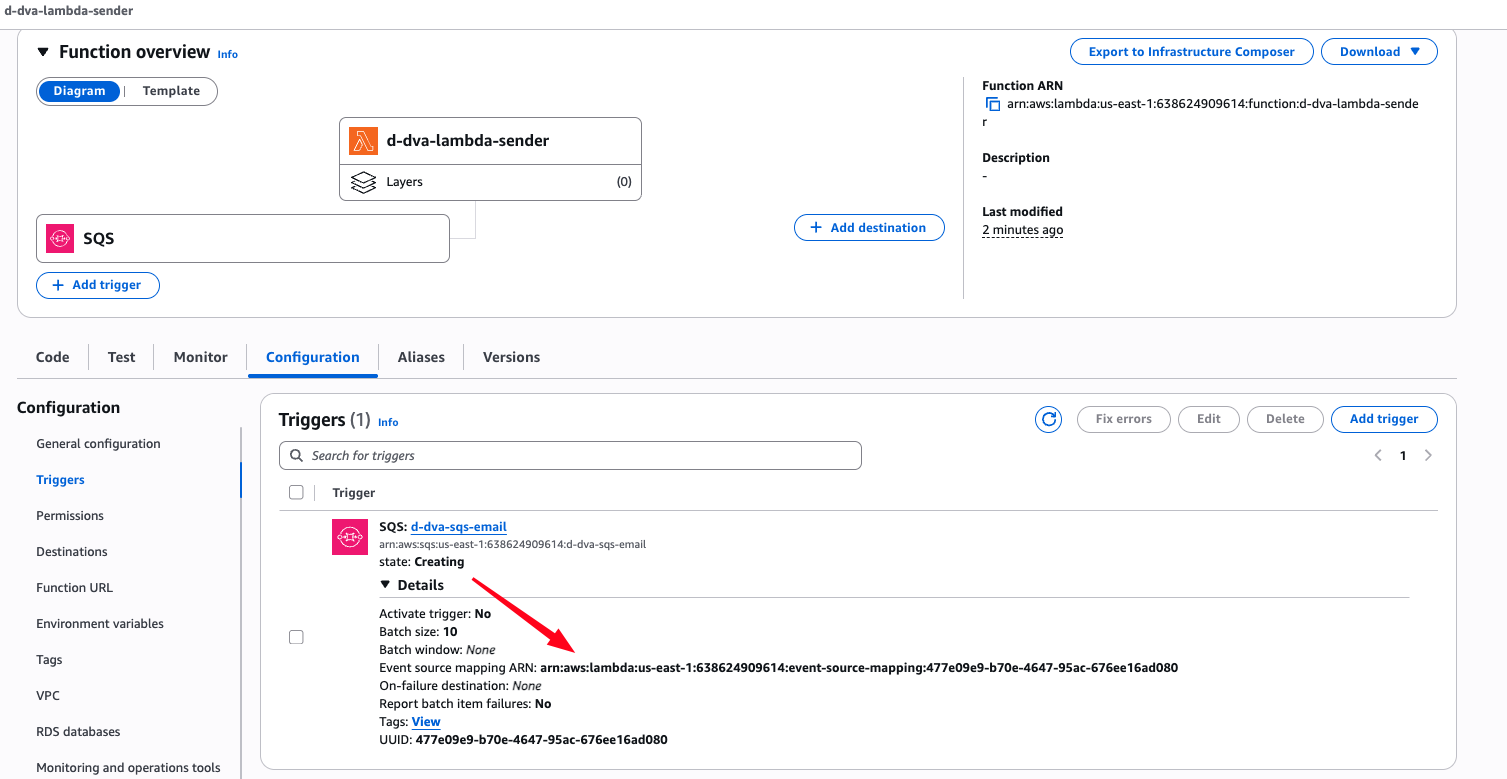
SQS queue: d-dva-sqs-email
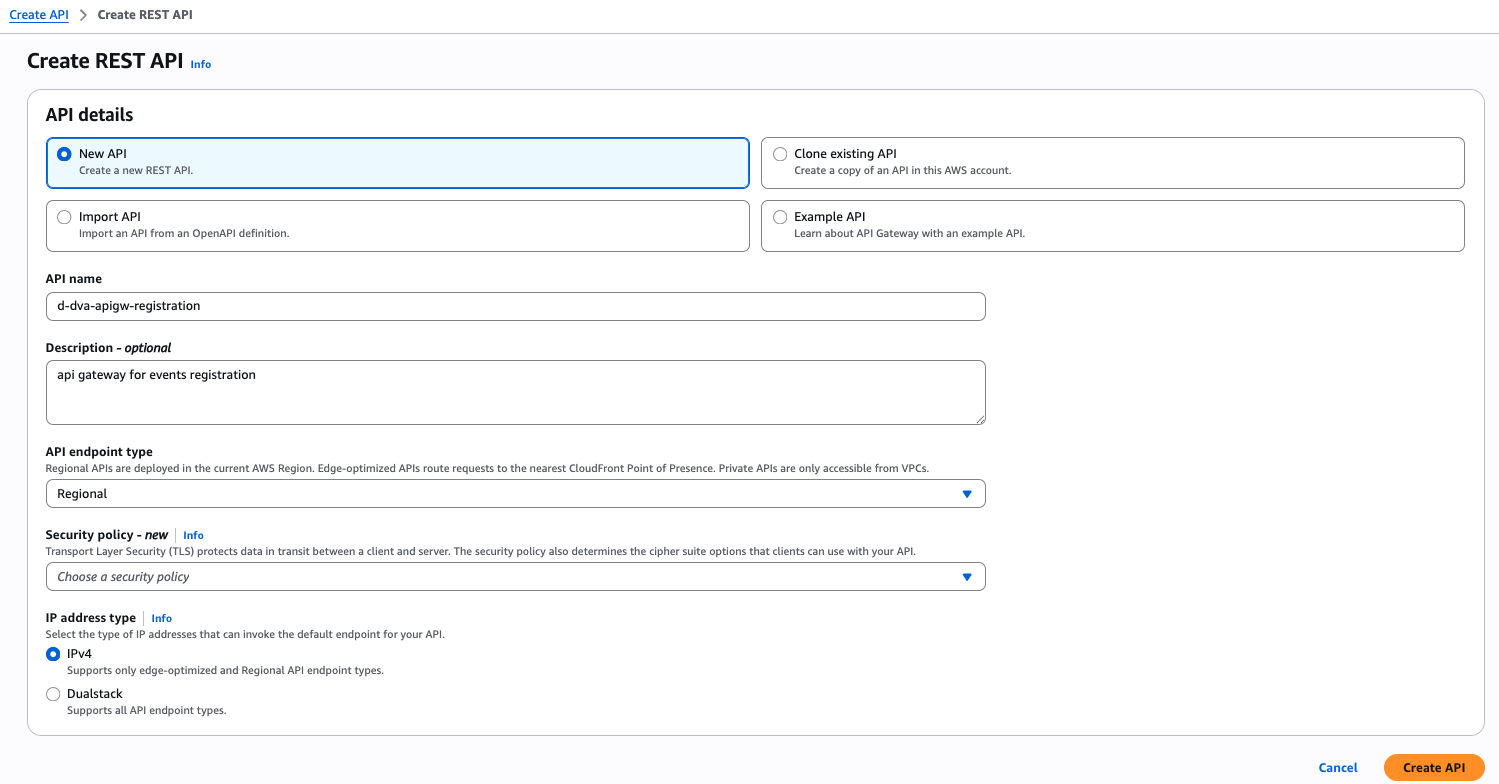
API Gateway → APIs → Create API
Choose an API type: REST API
API name: d-dva-apigw-registration
Description – optional: api gateway for events registration
API endpoint type: Regional
IP address type: IPv4
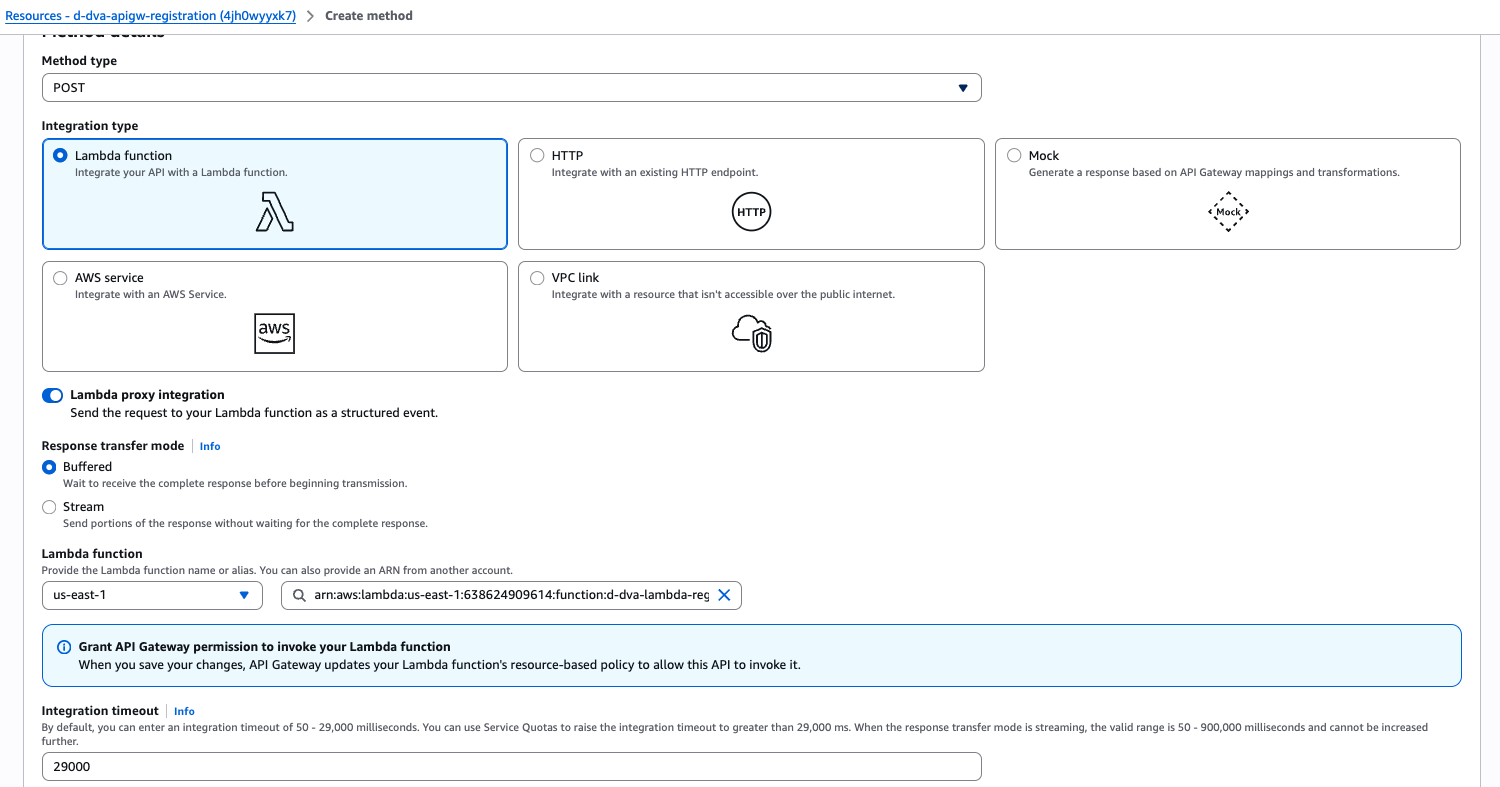
Method type: POST
Integration type: Lambda function
Lambda proxy integration: x
Lambda function: us-east-1 d-dva-lambda-registration
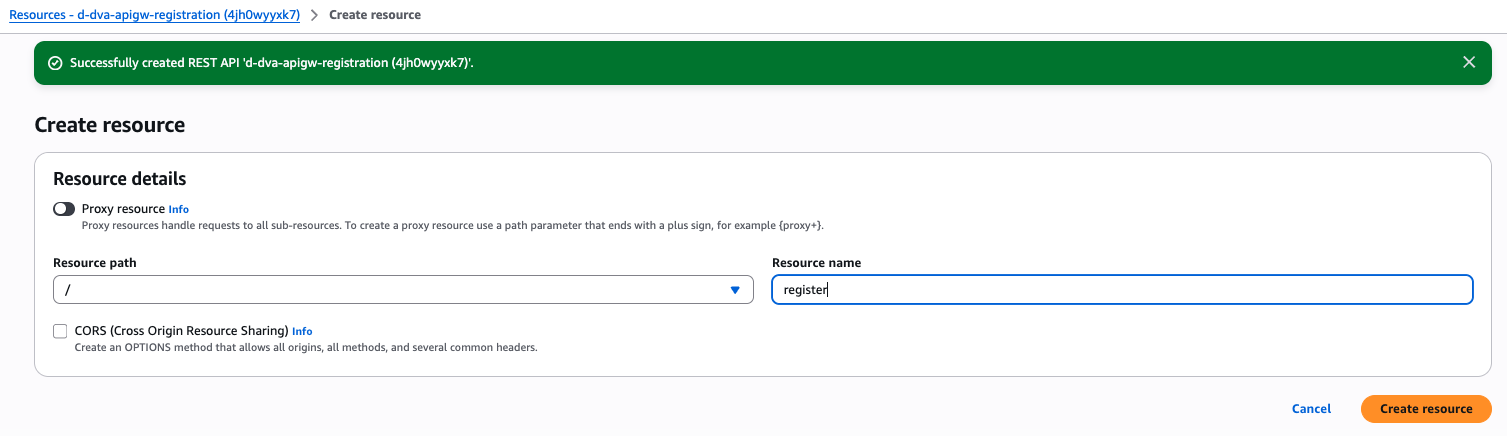
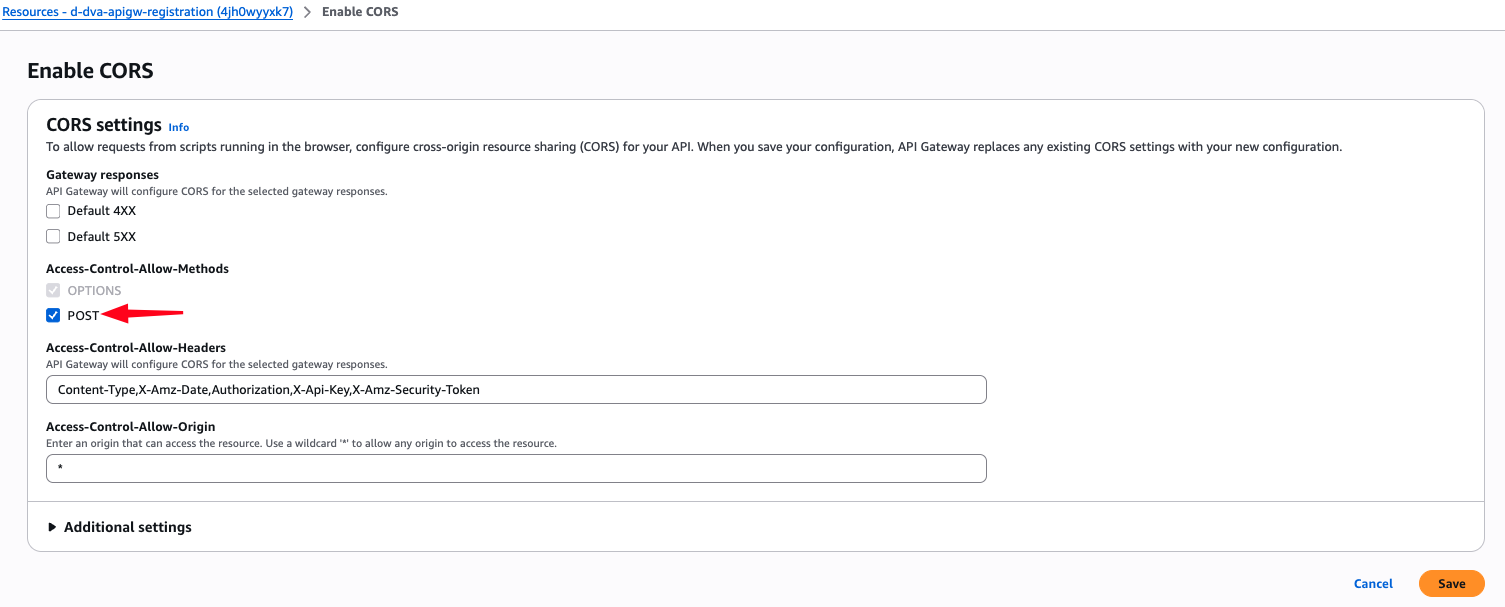
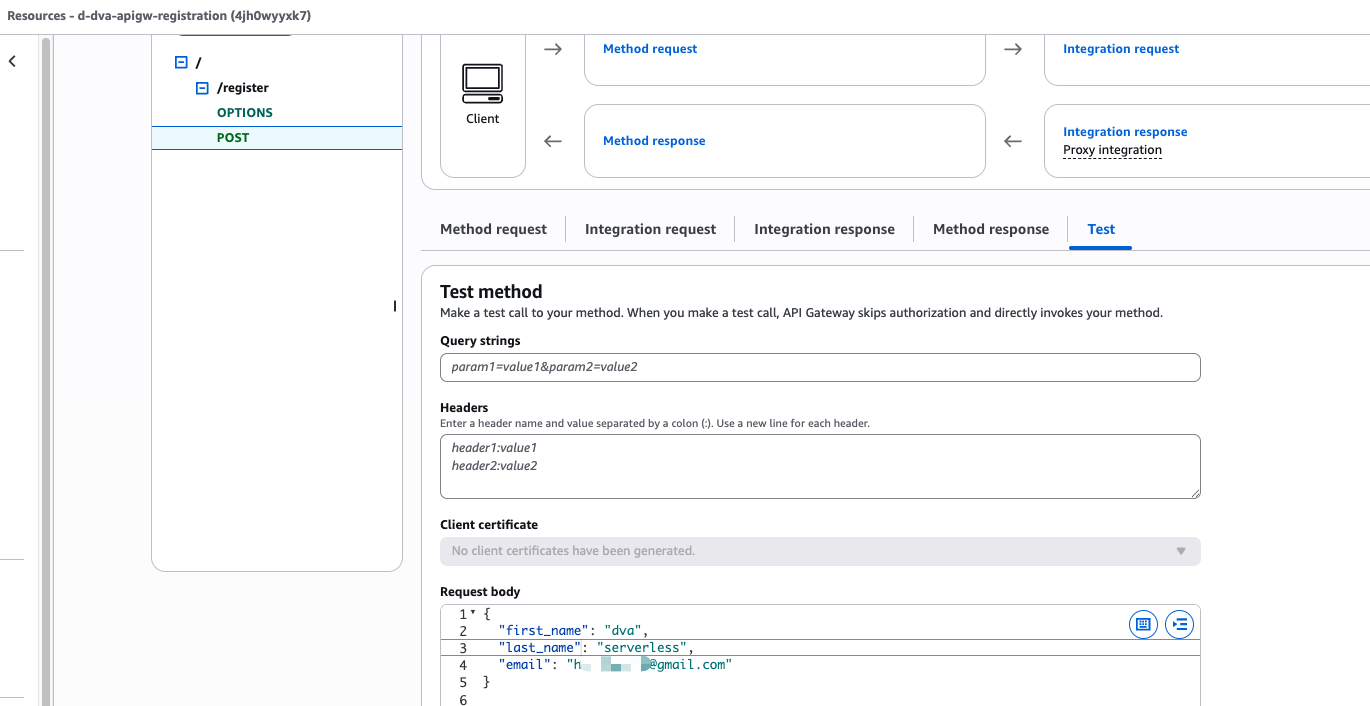
Resource ( /register ) → Enable CORS
Access-Control-Allow-Methods: POST
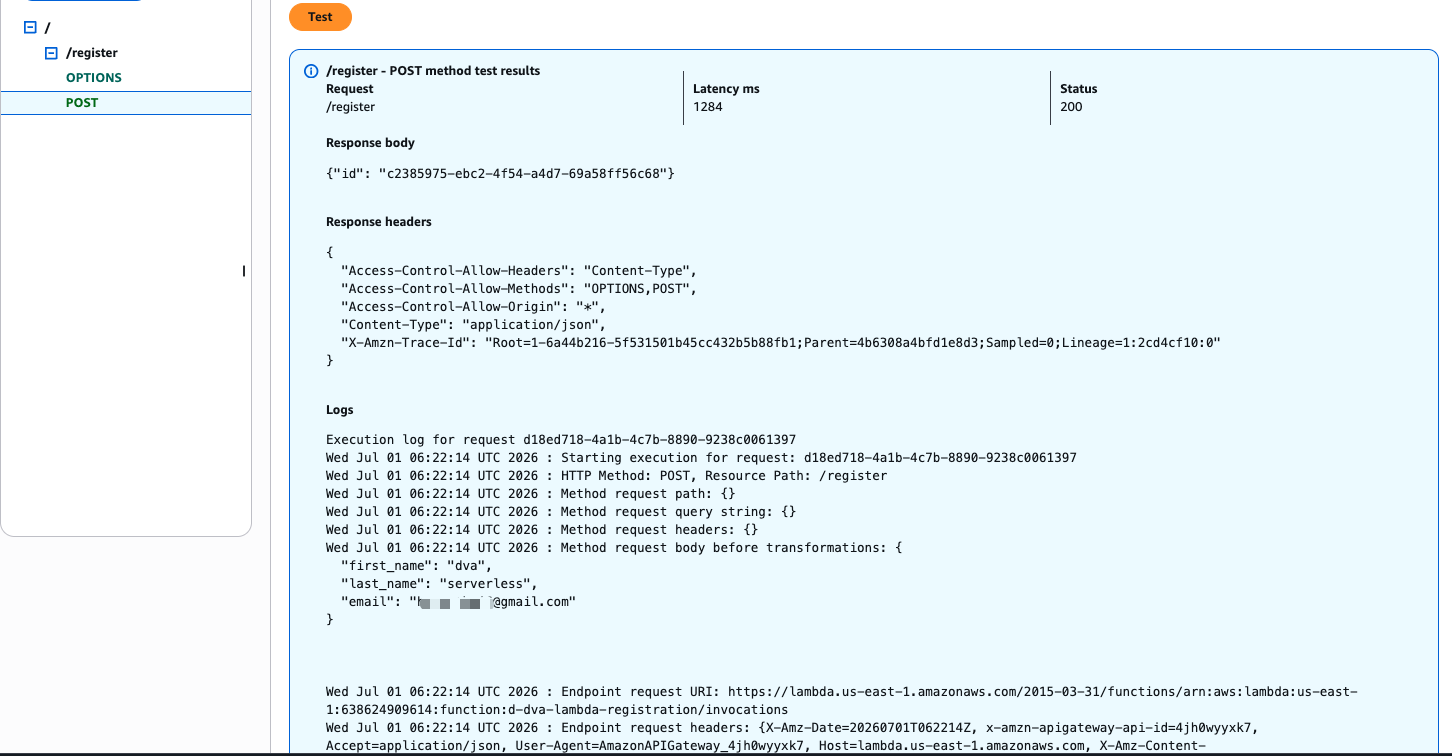
{ "first_name": "dva", "last_name": "serverless", "email": "your verified email in SES" } Kết quả trả về mã 200 là thành công.
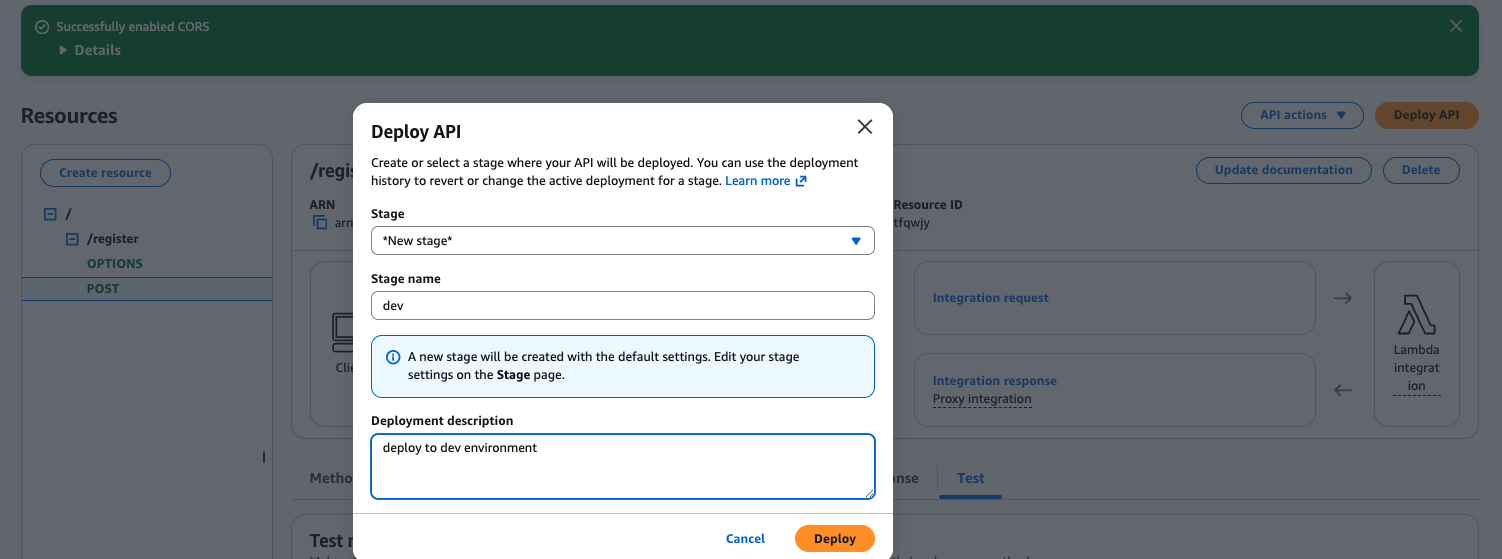
Stage: *New stage*
Stage name: dev
Deployment description: deploy to dev environment
<!doctype html> <html lang="en"> <head> <meta charset="utf-8" /> <title>Event Registration</title> <meta name="viewport" content="width=device-width, initial-scale=1" /> <style> :root { color-scheme: dark; } * { box-sizing: border-box; } html, body { margin:0; padding:0; background:#0b1020; color:#e9edf5; font-family: ui-sans-serif, system-ui, -apple-system, Segoe UI, Roboto, Arial; } .wrap { max-width:980px; margin:48px auto; padding:0 24px; } .card { background:#0f1b33; border:1px solid #1d2a4d; border-radius:16px; padding:28px; box-shadow:0 6px 30px rgba(0,0,0,.35); } h1 { margin:0 0 12px; font-size:28px; font-weight:800; } .muted { color:#b6c2df; margin-bottom:18px; } label { display:block; font-weight:700; margin:16px 0 8px; } .req { color:#ff5a7a; margin-left:4px; } input { width:100%; background:#0a1429; color:#eef3ff; border:1px solid #223055; border-radius:8px; padding:12px 14px; outline:0; transition:border .15s; } input:focus { border-color:#6ea8ff; box-shadow:0 0 0 3px rgba(110,168,255,.2); } input.err { border-color:#e66; box-shadow:0 0 0 3px rgba(230,102,102,.15); } .counter { font-size:12px; color:#8ea0c9; margin-top:6px; } .errText { color:#ffb8c7; font-size:12px; margin-top:6px; } .btn { margin-top:18px; background:linear-gradient(90deg,#6a5cff,#7f38ff); border:none; color:#fff; padding:12px 18px; font-weight:700; border-radius:10px; cursor:pointer; } .btn[disabled]{opacity:.6; cursor:not-allowed;} .alert { margin-top:16px; padding:12px 14px; border-radius:8px; } .ok { background:#10361f; color:#b8f5cf; border:1px solid #1e6d3d; } .err { background:#3a1520; color:#ffd2df; border:1px solid #7b2c41; } .note { margin-top:22px; line-height:1.6; color:#cbd6f3; } a { color:#8ab4ff; text-decoration:none; } a:hover{text-decoration:underline;} </style> </head> <body> <div class="wrap"> <div class="card"> <h1>Contact information</h1> <p class="muted"> This name will be printed on your badge. Your legal name, if different, can be provided in the event profile. </p> <form id="form" novalidate> <label>First name <span class="req">*</span></label> <input id="first" maxlength="100" aria-required="true" /> <div class="counter" id="c-first">0/100</div> <div class="errText" id="e-first" hidden></div> <label>Last name <span class="req">*</span></label> <input id="last" maxlength="100" aria-required="true" /> <div class="counter" id="c-last">0/100</div> <div class="errText" id="e-last" hidden></div> <label>Email <span class="req">*</span></label> <input id="email" type="email" maxlength="254" aria-required="true" /> <div class="counter" id="c-email">0/254</div> <div class="errText" id="e-email" hidden></div> <button class="btn" id="submit" type="submit">Continue</button> <div id="alert-ok" class="alert ok" hidden></div> <div id="alert-err" class="alert err" hidden></div> </form> <div class="note"> <h3 style="margin:18px 0 8px">AWS Event Terms</h3> <p> AWS takes reports of misconduct seriously and encourages event participants to report disruptive or otherwise unsafe behavior. Attendees who do not comply with the <a href="https://aws.amazon.com/codeofconduct/" target="_blank" rel="noreferrer">AWS Code of Conduct</a> may be required to leave all event venues and will be banned from future participation. </p> <p> By clicking Continue, you agree to the AWS Event Terms & Conditions and the AWS Code of Conduct. Your information will be handled in accordance with the AWS Privacy Notice. </p> </div> </div> </div> <script> const API_URL = "%%API_URL%%"; const NAME_MAX = 100, EMAIL_MAX = 254; const emailRe = /^[^\s@]+@[^\s@]+\.[^\s@]+$/; const $ = (id) => document.getElementById(id); const first = $("first"), last = $("last"), email = $("email"); const cFirst = $("c-first"), cLast = $("c-last"), cEmail = $("c-email"); const eFirst = $("e-first"), eLast = $("e-last"), eEmail = $("e-email"); const btn = $("submit"), ok = $("alert-ok"), err = $("alert-err"); function setErr(input, el, msg) { if (msg) { input.classList.add("err"); el.textContent = msg; el.hidden = false; } else { input.classList.remove("err"); el.hidden = true; el.textContent = ""; } } function count(el, counter, max) { const n = el.value.trim().length; counter.textContent = `${n}/${max}`; } function validate() { const f = first.value.trim(); const l = last.value.trim(); const m = email.value.trim(); let ok = true; // first_name if (!f) { setErr(first, eFirst, "First name is required"); ok = false; } else if (f.length > NAME_MAX) { setErr(first, eFirst, `Max ${NAME_MAX} characters`); ok = false; } else setErr(first, eFirst, ""); // last_name if (!l) { setErr(last, eLast, "Last name is required"); ok = false; } else if (l.length > NAME_MAX) { setErr(last, eLast, `Max ${NAME_MAX} characters`); ok = false; } else setErr(last, eLast, ""); // email if (!m) { setErr(email, eEmail, "Email is required"); ok = false; } else if (m.length > EMAIL_MAX) { setErr(email, eEmail, `Max ${EMAIL_MAX} characters`); ok = false; } else if (!emailRe.test(m)) { setErr(email, eEmail, "Email format is invalid"); ok = false; } else setErr(email, eEmail, ""); return ok; } ["input","blur"].forEach(ev => { first.addEventListener(ev, () => count(first, cFirst, NAME_MAX)); last.addEventListener(ev, () => count(last, cLast, NAME_MAX)); email.addEventListener(ev, () => count(email, cEmail, EMAIL_MAX)); }); count(first, cFirst, NAME_MAX); count(last, cLast, NAME_MAX); count(email, cEmail, EMAIL_MAX); document.getElementById("form").addEventListener("submit", async (e) => { e.preventDefault(); ok.hidden = true; ok.textContent = ""; err.hidden = true; err.textContent = ""; if (!validate()) return; btn.disabled = true; btn.textContent = "Submitting…"; try { const res = await fetch(API_URL, { method: "POST", headers: { "Content-Type": "application/json", }, body: JSON.stringify({ first_name: first.value.trim(), last_name: last.value.trim(), email: email.value.trim().toLowerCase() }) }); if (!res.ok) { const t = await res.text(); throw new Error(`API ${res.status}: ${t || "request failed"}`); } const data = await res.json().catch(() => ({})); ok.textContent = `Thanks! Your registration id is ${data.id || "(created)"}.Please check your email!!`; ok.hidden = false; first.value = ""; last.value = ""; email.value = ""; [first,last,email].forEach((el)=>el.classList.remove("err")); [cFirst,cLast,cEmail].forEach((c)=>c.textContent="0/0"); // will reset by count() count(first, cFirst, NAME_MAX); count(last, cLast, NAME_MAX); count(email, cEmail, EMAIL_MAX); } catch (ex) { err.textContent = ex.message || "Submit failed"; err.hidden = false; } finally { btn.disabled = false; btn.textContent = "Continue"; } }); </script> </body> </html>
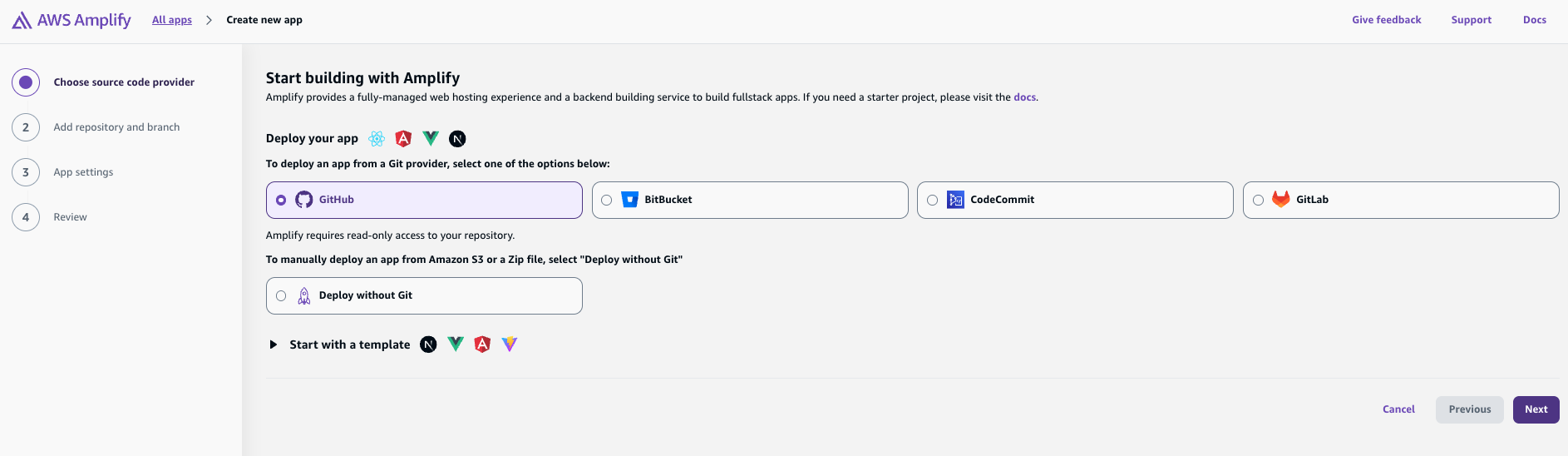
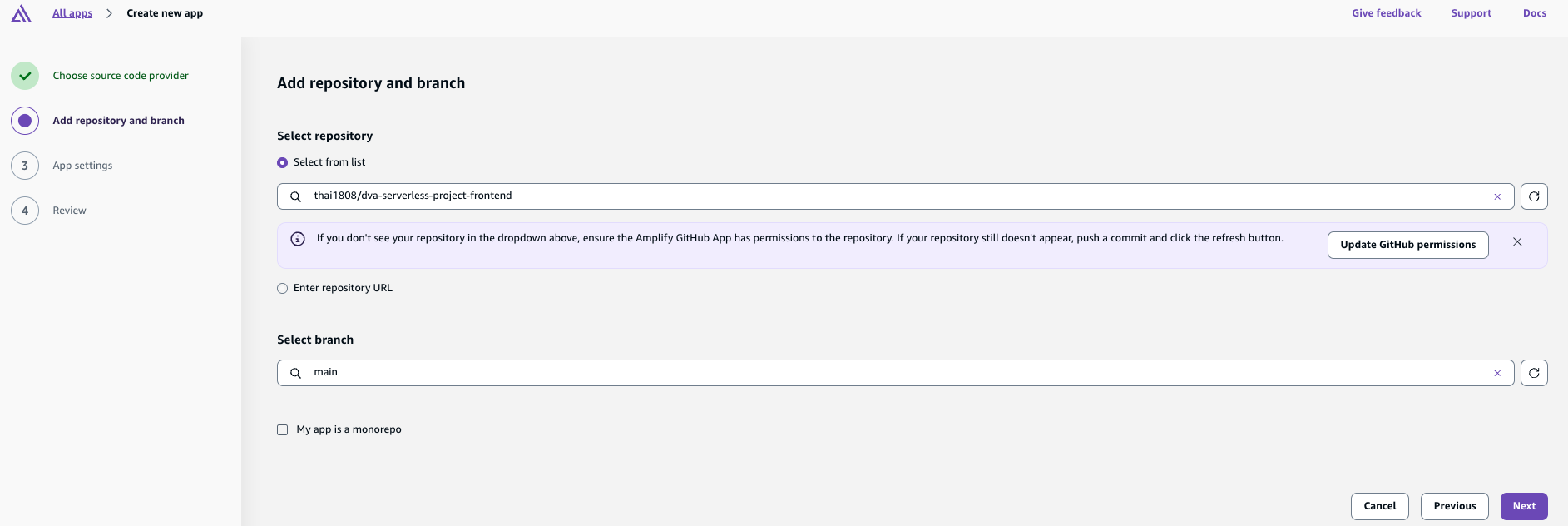
Chọn Github và liên kết Amplify với tài khoản Github.
Chọn repo dva-serverless-project-frontend.
App name: dva-serverless-project-frontend
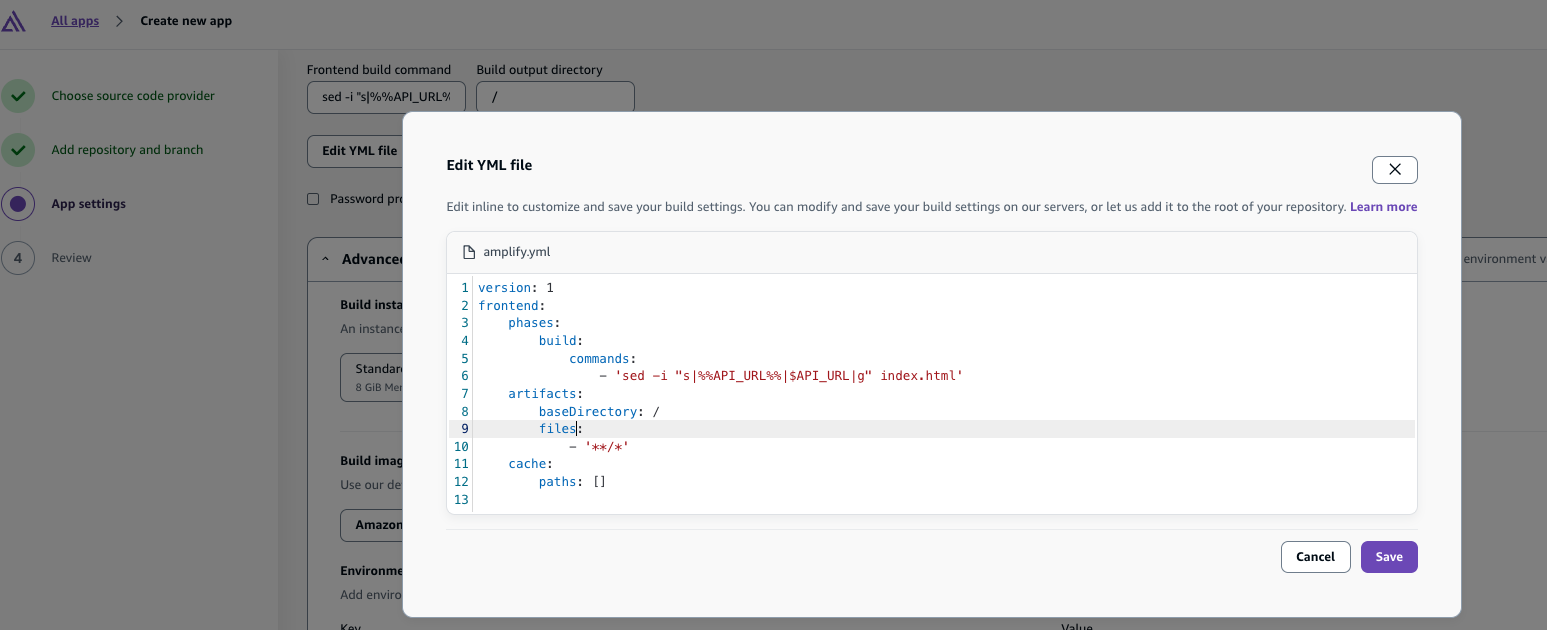
version: 1 frontend: phases: build: commands: - 'sed -i "s|%%API_URL%%|$API_URL|g" index.html' artifacts: baseDirectory: / files: - '**/*' cache: paths: []
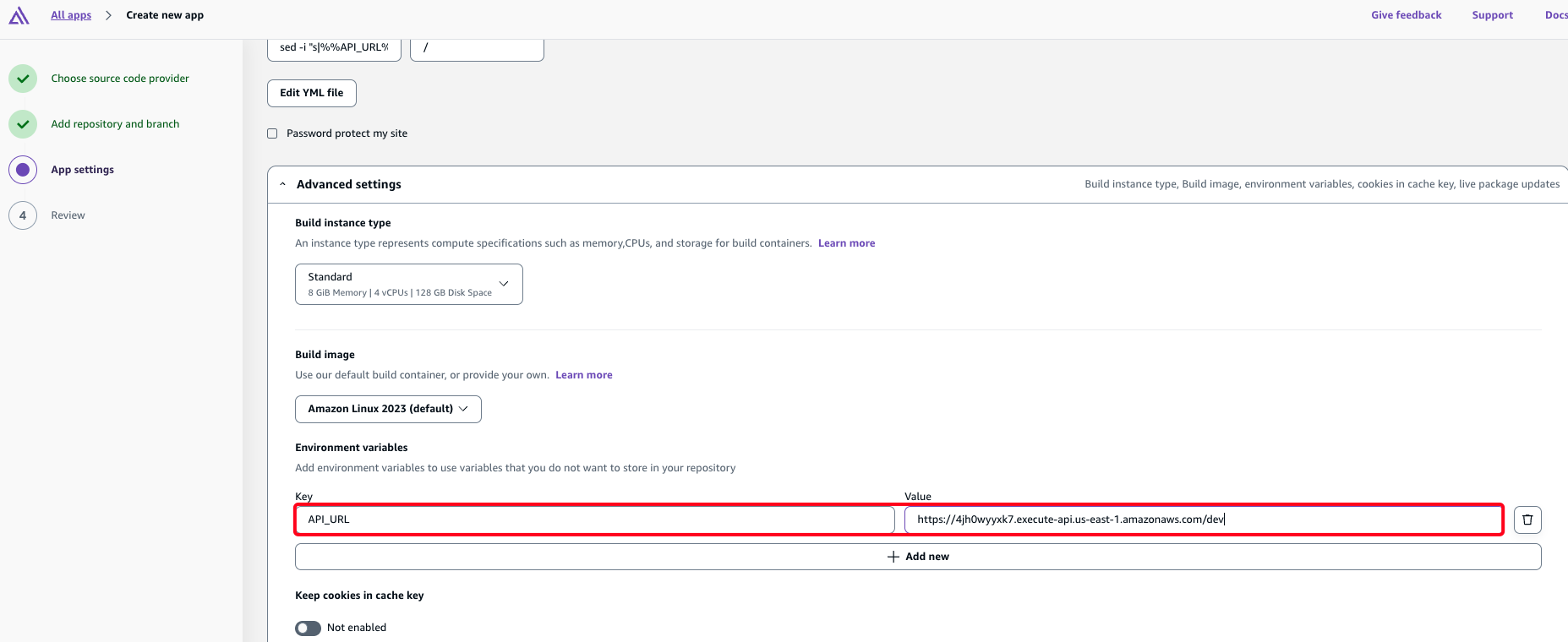
API_URL: your api gateway endpoint
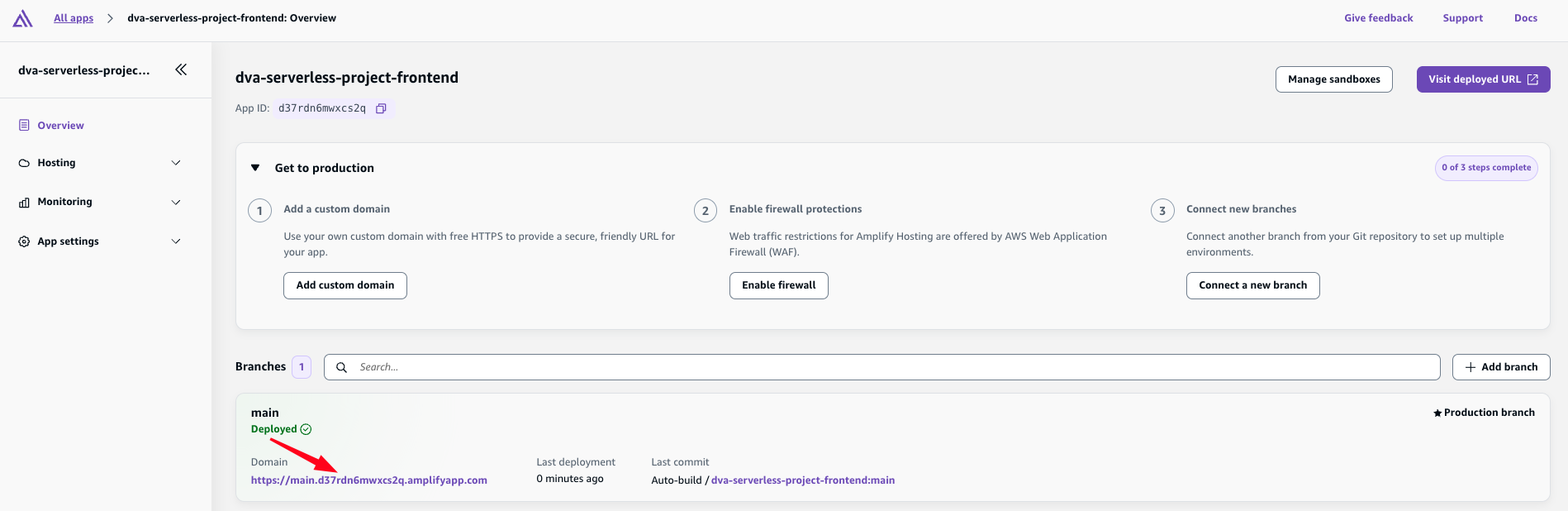
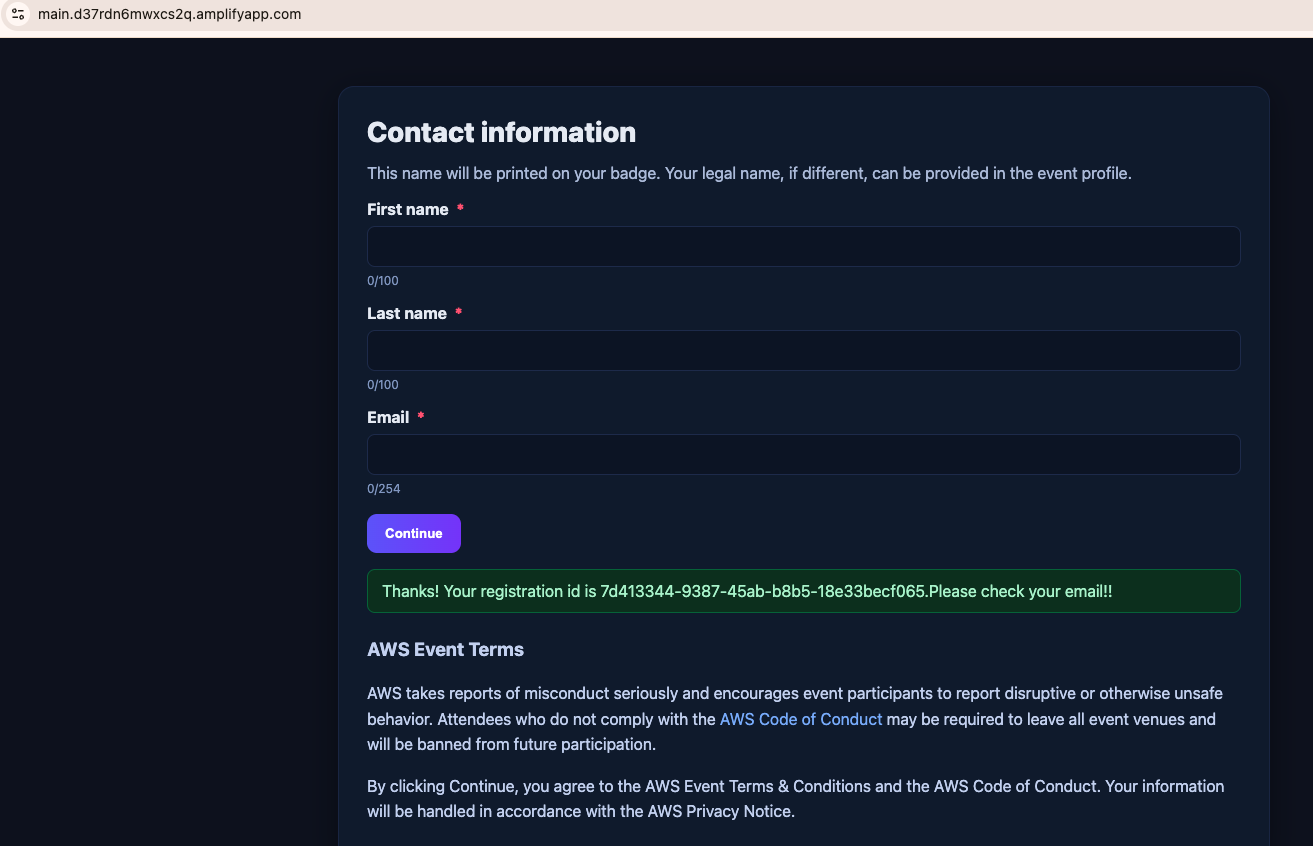
Truy cập vào domain mà Amplify đã tạo và điền thông tin form.
Kết quả bạn sẽ nhận được thông báo đăng ký thành công.
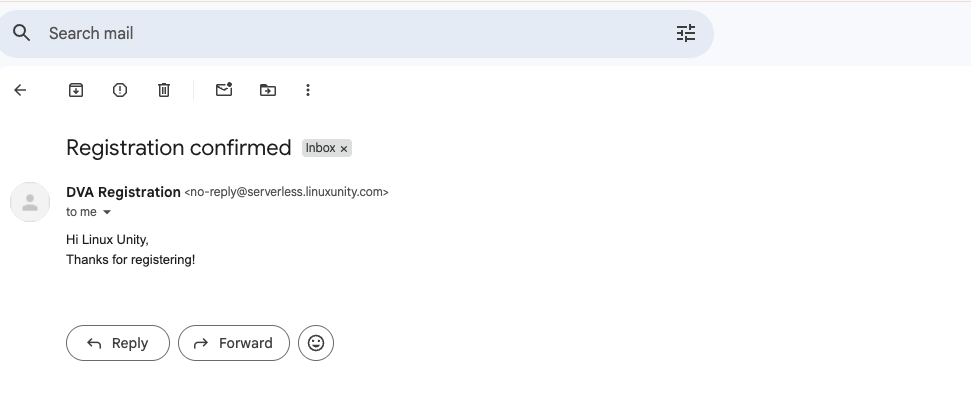
Ở phía user đăng ký sẽ nhận được email chào mừng:
Ở quản trị admin (email đã đăng ký SES trước đó) sẽ nhận được thông báo về người dùng mới đăng ký qua form.
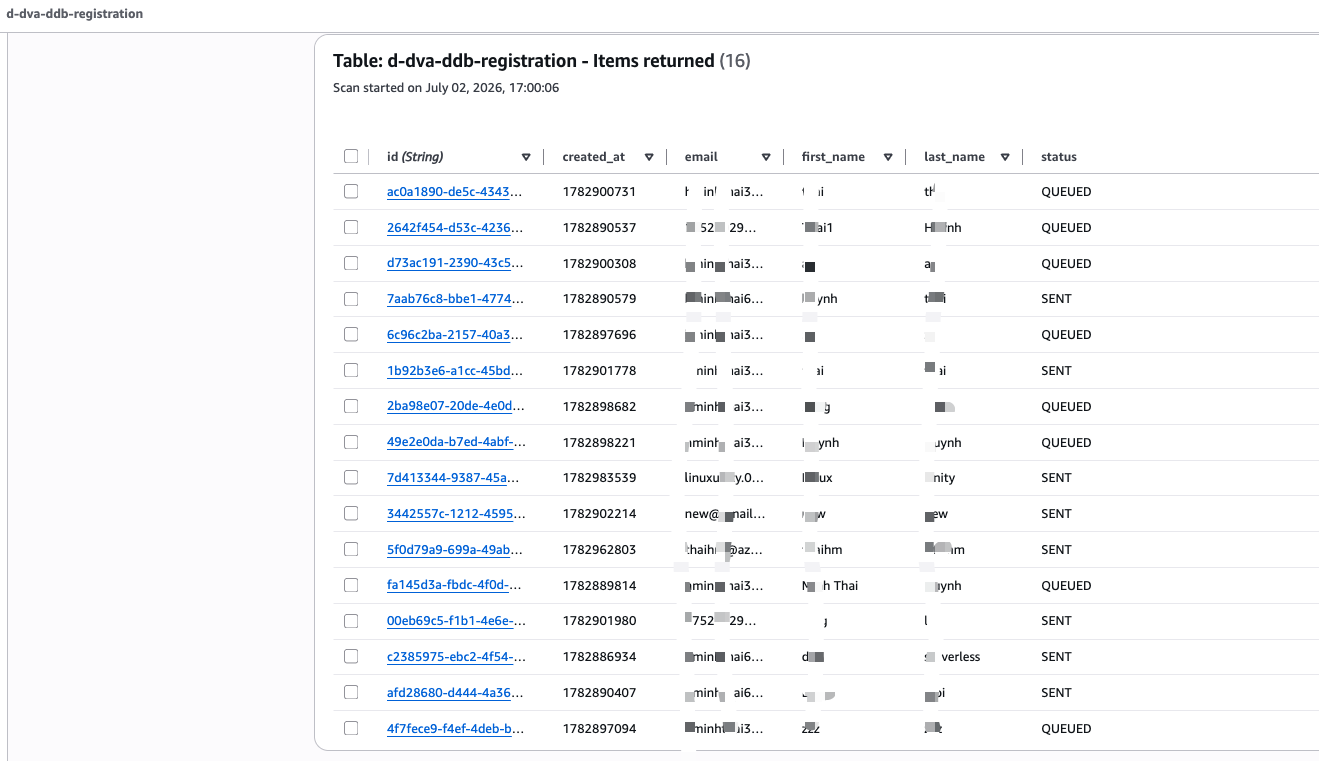
Truy cập vào DynamoDB table > Explore Table items cũng sẽ hiển thị các record của toàn bộ user đăng ký form.
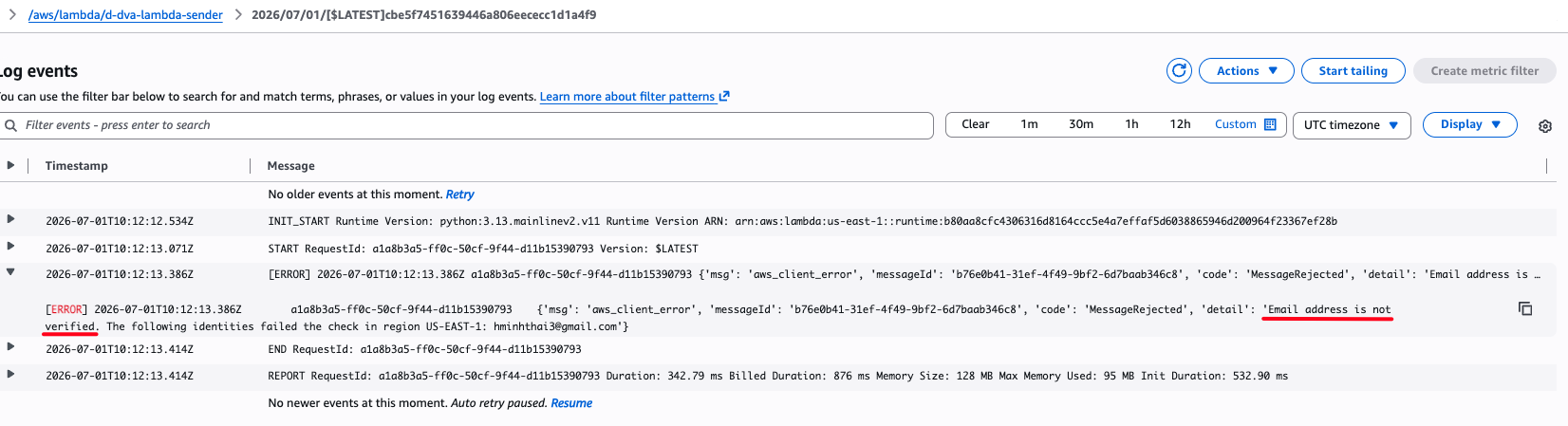
Trường hợp bạn không nhận được email chào mừng là do Amazon SES đang ở Sandbox nên email người nhận chưa được verify.
Truy cập vào Cloudwatch Log bạn sẽ thấy rõ điều đó
Để xử lý, bạn truy cập Amazon SES > Account dashboard > Request production access.
Sau đó điền: Mail type: Transactional và chờ đợi để AWS duyệt yêu cầu này.
Hệ thống đăng ký sự kiện này là một ví dụ điển hình cho cách xây dựng ứng dụng serverless trên AWS . Mỗi dịch vụ trong kiến trúc đảm nhiệm một vai trò riêng: frontend phục vụ người dùng, API Gateway và Lambda xử lý logic, DynamoDB lưu trữ dữ liệu, SQS tách tác vụ bất đồng bộ, còn SES và SNS phụ trách gửi thông báo.
Nhờ đó, toàn bộ quy trình từ submit form → lưu dữ liệu → gửi email → thông báo admin được tự động hóa hoàn toàn, đồng thời vẫn giữ được tính linh hoạt và khả năng mở rộng của mô hình serverless.
Nguồn tham khảo: Bài viết này được mình thực hành lại dựa trên kiến thức học và lab từ khóa AWS Developer Associate (DVA) tại CloudMentor Pro .